Offbeat
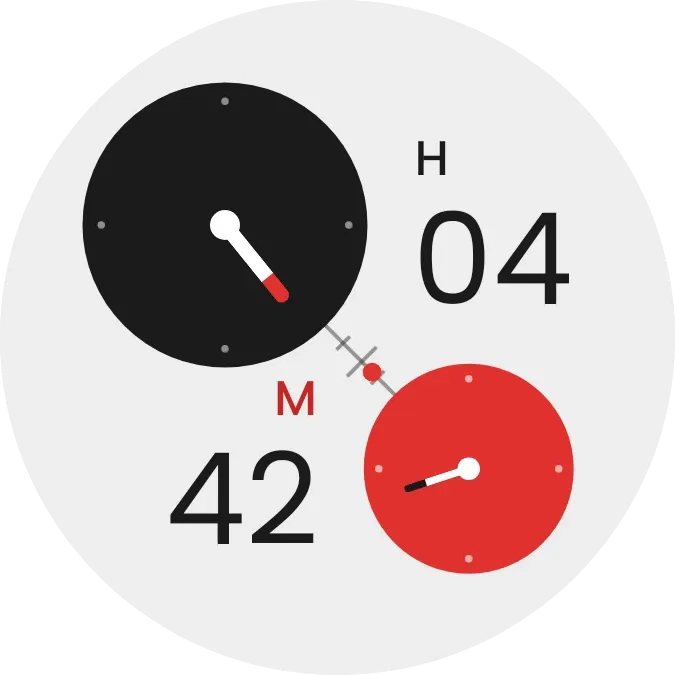
Offbeat places two dials on a pale circle, a large black one for hours at the upper left and a smaller red one for minutes at the lower right. Each dial has a moving hand, and large digits beside them show the hour next to an H and the minutes next to an M. After dusk the circle turns dark.
- Size
- 2x2 cells
- Kit
- Instruments
- Shows
- Time and date
- Look
- Minimal, bold shapes and typographic
- Colours
- White and black, light background
- Good for
- Daily routine, desk and work
- Android
- 10 or newer
- Needs
- No additional permissions
- Price
- Free
Kiwi is in beta and is not on Google Play yet. Join to request an invitation.
- analog-clock
- big-numbers
- black
- bold
- clock
- clock-hands
- dial
- digital-clock
- dots
- geometric
- grey
- light
- minimal
- red
- round
- time
- typographic
- watch-face
- white
What changes
- The hour hand on the black dial turns as the hours pass, and the two-digit number beside the H shows the current hour.
- The minute hand on the red dial turns as the minutes pass, and the number beside the M shows the current minutes.
- A small red dot slides along the short diagonal scale between the two dials as each hour moves on.
- In the morning and afternoon the circle is pale with a black hour dial. In the evening and at night it turns dark and the hour dial becomes light.
- The red minute dial, the red dot and the red tip of the hour hand stay red in both looks.
Data and settings
- Reads the current time. There is nothing to set.
Set it up
- Open Offbeat in Kiwi, either from its kit or from this page.
- Tap Use.
- Confirm your launcher's prompt to place it on your home screen.
Widgets like Offbeat
 RivetWatch Face
 NightspokeWatch Face
 Loose EndsNothing
 Lume ScoutWatch Face