Shape Charge
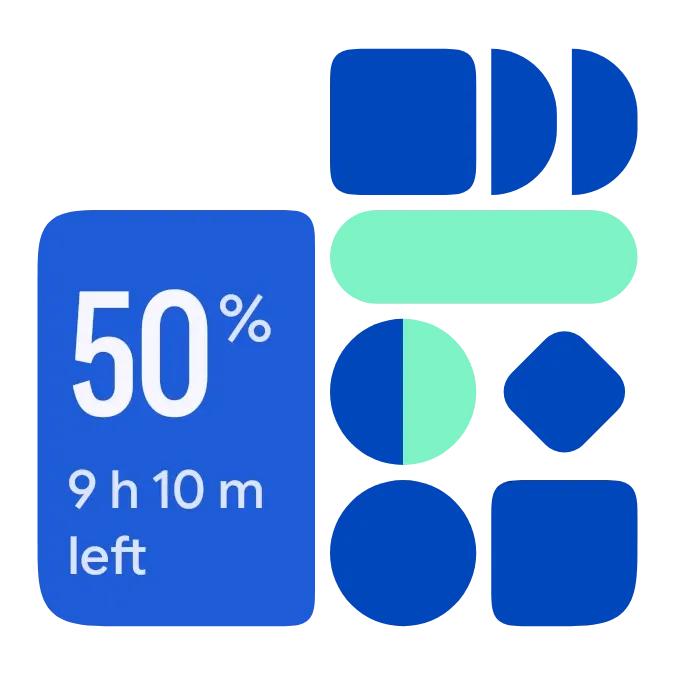
Shape Charge pairs a blue tile of large, narrow numerals with a mosaic of navy shapes and a mint pill. The tile shows your battery percentage and the time left. A round dial in the mosaic fills with mint as the charge level rises.
- Size
- 2x2 cells
- Kit
- Material Expressive
- Shows
- Battery
- Look
- Bold shapes, bento and colourful
- Colours
- Blue and mint, light background
- Looks like
- Pixel widgets
- Good for
- Charging, overnight charging and daily check
- Android
- 10 or newer
- Needs
- No additional permissions
- Price
- Pro
Kiwi is in beta and is not on Google Play yet. Join to request an invitation.
- battery
- battery-time-left
- battery-widget
- big-numbers
- blue
- bold
- bright
- charging
- cheerful
- clean
- colourful
- condensed
- dial
- geometric
- material-expressive
- mint-green
- navy
- percentage
- pill
- playful
- progress
- rounded
- shapes
- tiles
- time-left
What changes
- The large number is the battery percentage. At 100 percent the numerals get slightly smaller to fit the tile.
- The round dial fills clockwise with mint in proportion to the charge level. At 50 percent, half of it is mint.
- On battery, the tile shows the time left, such as 9 h 10 m left. If no estimate is available, it shows On battery.
- While charging, the tile shows Full in with the time remaining. If no estimate is available, it shows Charging.
- When charging, the navy diamond in the mosaic turns into a mint burst with a bolt. When the battery is full, the tile reads Full.
- When the battery is low, the pill and the dial fill change from mint to red. A tap on the widget opens the battery view.
Data and settings
- Reads the battery charge level as a percentage.
- Reads whether the phone is charging and whether the battery is full.
- Reads the estimated time left on battery and the estimated time until full.
- Reads whether the battery is low, which changes the colour of the pill and dial.
Set it up
- Open the widget in Kiwi, either from its kit or from this page.
- Tap Use.
- Confirm your launcher's prompt to place it on your home screen.
Good to know
- The time left and time to full are estimates. When the phone gives none, the tile shows On battery or Charging in their place.
- It shows the battery of the phone it is placed on.
Widgets like Shape Charge
 Halfway PillMaterial You
 Tadpole HalfMaterial You
 VoltwellOne UI
 Stacked ChargePlayful



