Reminders Small
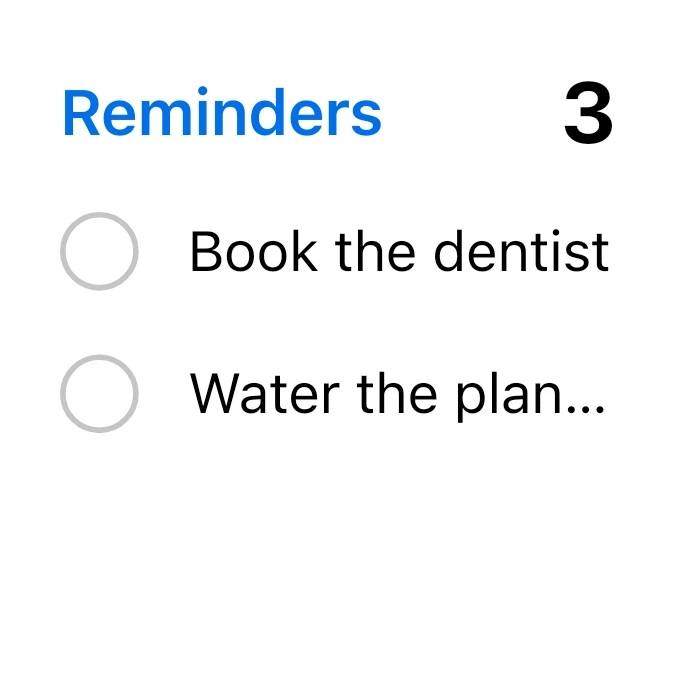
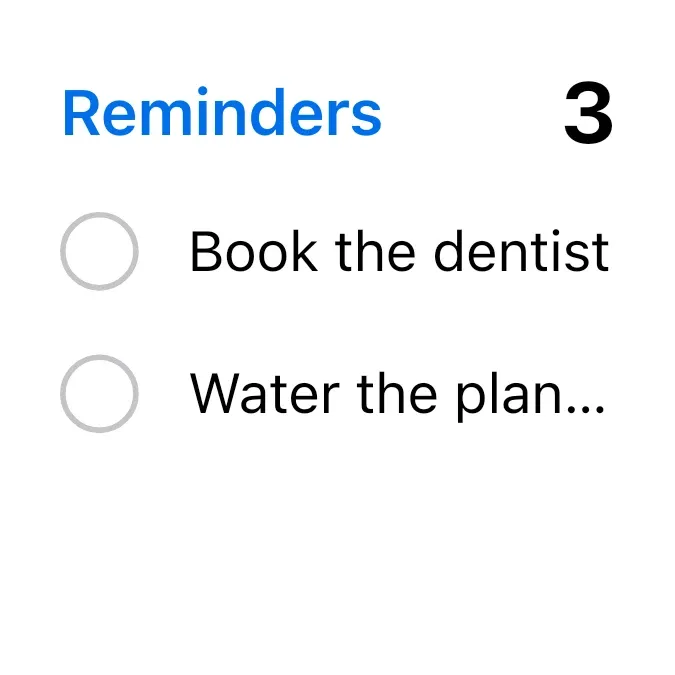
Reminders Small shows a to-do count and your next reminders in a small white card. The blue title Reminders sits at the top left, with the number of items left in bold black at the right. Below are up to three open reminders, each with an empty grey circle and a single line of text.
- Size
- 2x2 cells
- Kit
- iOS & macOS
- Shows
- Notes and to-dos
- Look
- Minimal and monochrome
- Colours
- White, light background
- Looks like
- iPhone widgets
- Good for
- Errands
- Android
- 10 or newer
- Needs
- No additional permissions
- Price
- Free
Kiwi is in beta and is not on Google Play yet. Join to request an invitation.
- ios
- reminders
- to-do
What changes
- The number at the top right is how many to-dos are left, and it changes as items are added or completed.
- Up to three open reminders from the top of your list appear, each on one row. Completed items are not shown.
- Tapping a reminder's circle toggles that item. Tapping its text or the card opens the list for editing.
- A reminder title too long for the row is cut off with an ellipsis.
- When you have no reminders, the card shows the text Tap to add a reminder.
- When every reminder is done, the card shows the text All reminders done.
Data and settings
- Reads your to-do items from notes: the text of each item and whether it is done.
- Nothing in the widget itself needs to be set.
Set it up
- Open the widget in Kiwi, either from its kit or from this page.
- Tap Use.
- Confirm your launcher's prompt to place it on your home screen.
Good to know
- Only three rows fit, so the count at the top can be higher than the number of reminders listed.
- Reminders come from your notes, so the card is empty until you have to-do items there.
- Long reminder titles are shortened to one line, so you may not see the full text on the card.
Widgets like Reminders Small
 TicktideMaterial You



