Copper Swing
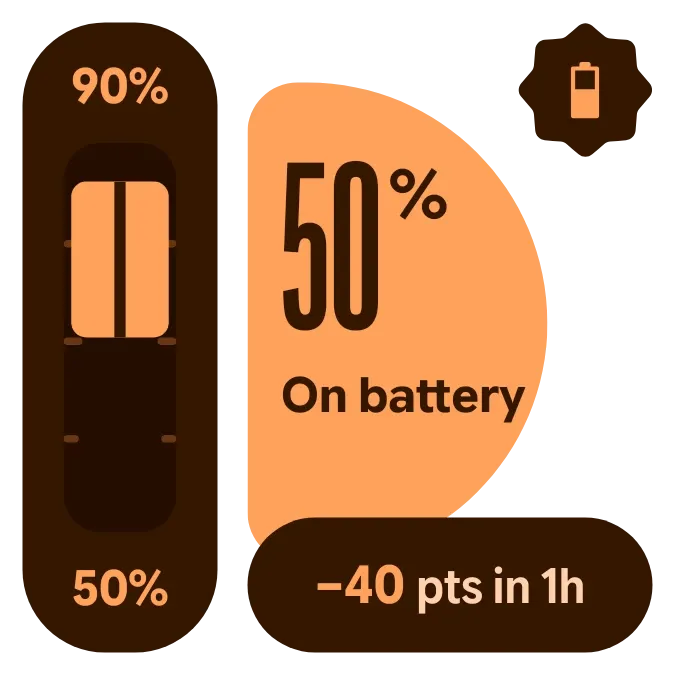
Copper Swing shows your battery percentage in large dark numerals on an orange half-circle, with the charging status written beneath it. A tall gauge on the left marks the high and low battery readings of the past hour, and a rounded pill below shows the net change in points.
- Size
- 2x2 cells
- Kit
- Material Expressive
- Shows
- Battery
- Look
- Bold shapes, typographic and minimal
- Colours
- Black and orange
- Looks like
- Pixel widgets
- Good for
- Checking battery drain, monitoring battery usage and checking charge before leaving
- Android
- 10 or newer
- Needs
- No additional permissions
- Price
- Free
Kiwi is in beta and is not on Google Play yet. Join to request an invitation.
- battery
- battery-detail
- battery-drain
- battery-history
- battery-level
- big-numbers
- bold
- brown
- gauge
- geometric
- material-expressive
- orange
- percentage
- pill
- rounded
- tick-marks
- transparent
- typographic
- warm
What changes
- The gauge fills between the highest and lowest battery levels of the past hour, with the higher value labelled at the top and the lower one at the bottom.
- While charging, the filled part of the gauge has a wavy line down its middle and the badge shows a bolt. On battery, the line is straight.
- When not charging, the badge shows a battery icon that is nearly empty when the level is low, and fuller at roughly 45 and 75 percent.
- The pill reads the change as a signed number, such as +6 pts in 1h or −40 pts in 1h. If nothing changed it reads 0 pts in 1h and the gauge shows a thin marker.
- When there is no reading from an hour ago, the gauge shows a history icon with dashes, and the pill reads No history.
- Tapping the widget opens the battery screen.
Data and settings
- Reads your current battery level and the status text, such as On battery.
- Reads whether the phone is charging and whether the battery is low.
- Reads your battery level from an hour ago to work out the swing and the net change.
- There is nothing to set.
Set it up
- Open the widget in Kiwi, either from its kit or from this page.
- Tap Use.
- Confirm your launcher's prompt to place it on your home screen.
Good to know
- The gauge and the net change need a battery reading from an hour ago, so they show dashes and No history until one is available.
- The change is only measured over the past hour, so it does not show longer trends.
Widgets like Copper Swing
 Halfway PillMaterial You
 Tadpole HalfMaterial You
 Halflit StripesNothing
 Emerald VaultTactile Hardware



