Juice Skyline
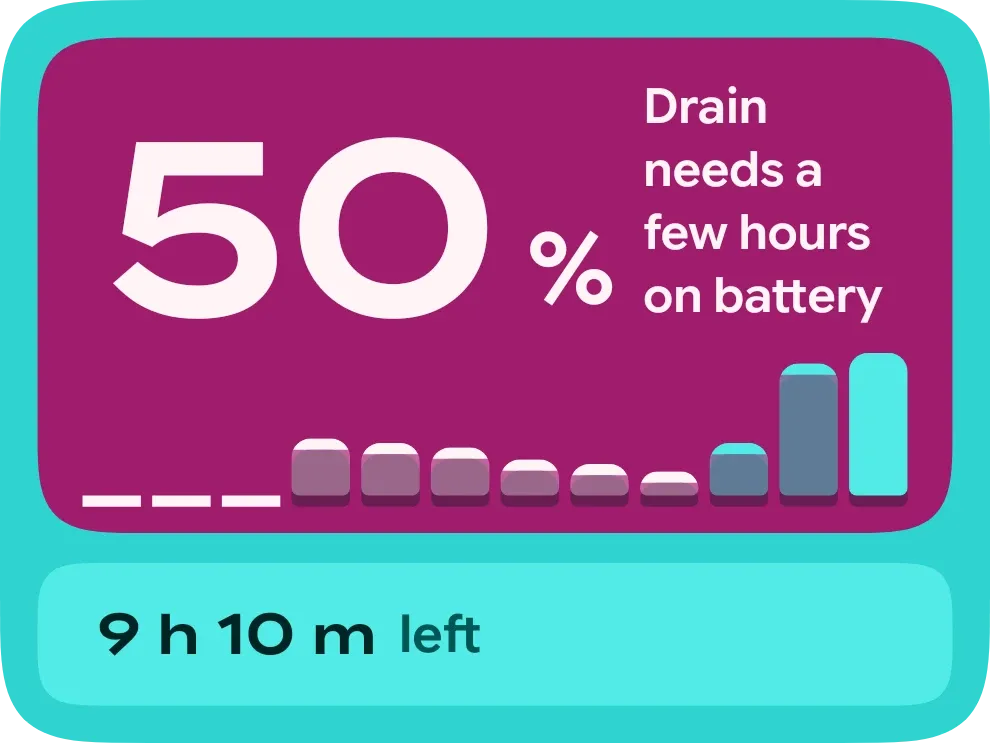
Juice Skyline shows your battery in a magenta panel inside a turquoise frame. A large number sits at the top left, with a row of bars along the bottom of the panel that record recent charge levels. A pale turquoise strip underneath gives the time left or the charging status.
- Size
- 3x2 cells
- Kit
- Material Expressive
- Shows
- Battery
- Look
- Bold shapes, colourful and typographic
- Colours
- Pink and teal, dark background
- Looks like
- Pixel widgets
- Good for
- Daily battery checks, commuting and travel
- Android
- 10 or newer
- Needs
- No additional permissions
- Price
- Free
Kiwi is in beta and is not on Google Play yet. Join to request an invitation.
- battery
- battery-detail
- battery-history
- battery-monitor
- battery-time-left
- big-numbers
- bold
- bright
- charge-history
- chart
- colourful
- cyan
- material-expressive
- percentage
- pink
- playful
- rounded
- typographic
- white
What changes
- Once it has a drain rate, the big number shows the percent lost per hour, and the strip below shows the current charge level at its left.
- Until it has a drain rate, the big number is the charge level with a percent sign. Below 100 percent it adds the note that drain needs a few hours on battery.
- Each bar is one point in the charge history, with height showing the level. The newest bar is solid turquoise, and bars from times you were charging are tinted turquoise.
- Times with no recorded level appear as short flat dashes instead of bars.
- On battery, the strip shows the time left, such as 9 h 10 m left. If no estimate exists yet, it says Estimate pending.
- While charging, the strip shows Full in with the time to full. If that time is unknown it says Plugged in, and at full charge it says Fully charged.
Data and settings
- Reads the battery charge level as a percentage.
- Reads whether the phone is charging and whether the battery status is full.
- Reads the drain rate, the estimated time left, and the estimated time to full.
- Reads the recent battery history, including the level at each point and whether it was charging.
- Has nothing to set.
Set it up
- Open Juice Skyline in Kiwi, either from its kit or from this page.
- Tap Use.
- Confirm your launcher's prompt to place the widget on your home screen.
Good to know
- The drain rate needs a few hours on battery, so a new widget shows the charge level instead.
- The time left, time to full and drain rate are estimates and can show as pending.
- The history bars only cover times with recorded levels. Earlier gaps show as dashes.
Widgets like Juice Skyline
 Fizz TubeGlass
 Tonic JarOne UI
 Straw ScrapePlayful
 Emerald VaultTactile Hardware



