Lilac Lullaby
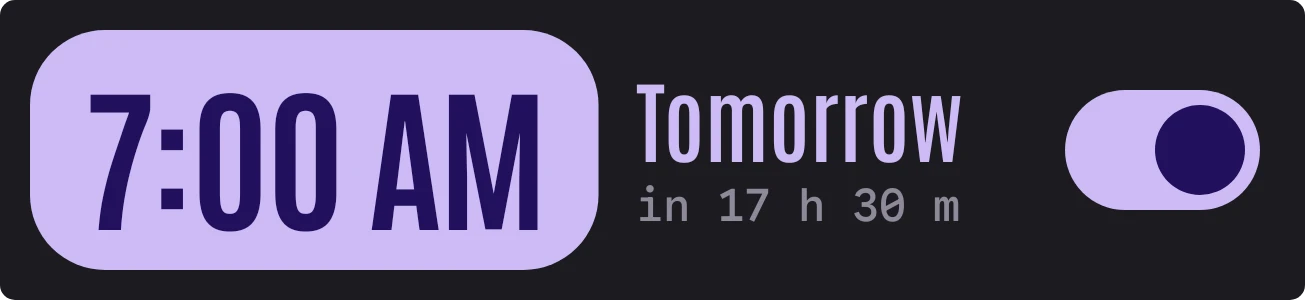
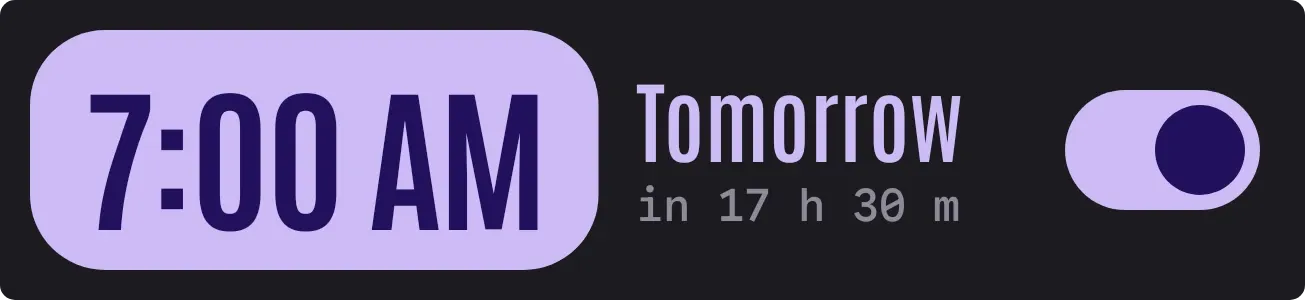
Lilac Lullaby shows your alarm time in tall, condensed digits inside a lilac capsule on a dark background. Beside it are a label for when the alarm rings, such as Tomorrow, a small countdown in hours and minutes, and a switch on the right. With no alarm set, the capsule and switch turn grey.
- Size
- 4x1 cells
- Kit
- Material Expressive
- Shows
- Sky
- Look
- Typographic, bold shapes and minimal
- Colours
- Black and purple, dark background
- Looks like
- Pixel widgets
- Good for
- Bedtime, morning routine and sleep
- Android
- 10 or newer
- Needs
- No additional permissions
- Price
- Free
Kiwi is in beta and is not on Google Play yet. Join to request an invitation.
- alarm
- alarm-clock
- alarm-time
- big-numbers
- bold
- clock
- condensed
- countdown
- dark
- digital-clock
- lilac
- minimal
- night
- pastel
- pastel-purple
- pill
- purple
- rounded
- soft
- switch
- time
- toggle
- tomorrow
- typographic
- wake-up
What changes
- With an alarm set, the time appears in bold dark digits on a lilac capsule. The label and countdown beside it are lilac and grey, and the switch is filled lilac.
- The label gives the day the alarm rings, for example Tomorrow. Beneath it, the countdown reads like in 10 h 25 m.
- With no alarm set, the capsule turns dark grey and shows Off in thin grey digits. The label reads No alarm, and the line beneath it reads Tap to set one.
- In the off state the switch becomes an outlined grey track with a small grey dot on the left.
- Tapping the widget opens your alarms.
Data and settings
- Reads your next alarm: whether one is set, its time, the day it rings, and how long until it goes off.
Set it up
- Open Lilac Lullaby in Kiwi, either from its kit or from this page.
- Tap Use.
- Confirm your launcher's prompt to place it on your home screen.
Good to know
- It shows a single alarm time and its countdown, so it only reflects the alarm that is currently set.
Widgets like Lilac Lullaby
 Lilac ReelMaterial You
 HourlaceClear
 Dawn DanglerPlayful
 CandlewickSoft UI



