Volt Mosaic
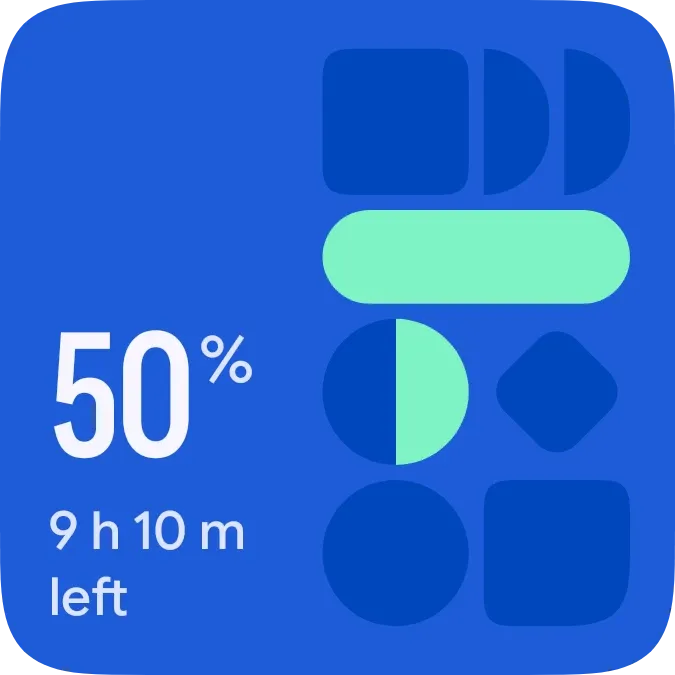
Volt Mosaic is a cobalt blue tile with a stack of deep-blue and mint shapes down the right side. On the left it shows your battery percentage in large numbers, with an estimate of the time left beneath it. One of the shapes is a circular gauge that fills with mint in proportion to your charge.
- Size
- 2x2 cells
- Kit
- Material Expressive
- Shows
- Battery
- Look
- Bold shapes, colourful and minimal
- Colours
- Blue, dark background
- Looks like
- Pixel widgets
- Good for
- Daily battery checks, before heading out and travel
- Android
- 10 or newer
- Needs
- No additional permissions
- Price
- Pro
Kiwi is in beta and is not on Google Play yet. Join to request an invitation.
- battery
- battery-detail
- battery-gauge
- battery-time-left
- big-numbers
- blue
- bold
- bright
- dial
- geometric
- material-expressive
- material-you
- minimal
- mint-green
- navy
- percentage
- pill
- playful
- rounded
- shapes
- typographic
- white
What changes
- The large number follows your battery level, and the circular gauge fills with mint clockwise from the top to match it. The rest of the gauge stays deep blue.
- On battery, the text under the percentage shows the estimated time left, such as 9 h 10 m, followed by the word left.
- While charging, the diamond shape is replaced by a mint burst with a lightning bolt, and the text shows Full in with the time to a full charge.
- When the battery is full, the text under the percentage reads Full. At 100 the number is drawn slightly smaller so it fits.
- When the battery is low, the long pill and the gauge fill change from mint to red.
- Tapping the widget opens the battery information on your phone.
Data and settings
- Reads your battery level, shown as the percentage and as the fill of the circular gauge.
- Reads whether the phone is charging or full.
- Reads the estimated time left on battery and the estimated time until fully charged.
Set it up
- Open the widget in Kiwi, either from its kit or from this page.
- Tap Use.
- Confirm your launcher's prompt to place it on your home screen.
Good to know
- The time left and time to full are estimates from your phone. When it has none, the widget shows On battery or Charging instead.
- The estimates can change as your phone's usage changes, so the time shown may shift between updates.
Widgets like Volt Mosaic
 Emerald VaultTactile Hardware
 Halfway PillMaterial You
 Tonic JarOne UI
 Tadpole HalfMaterial You



