Clasp
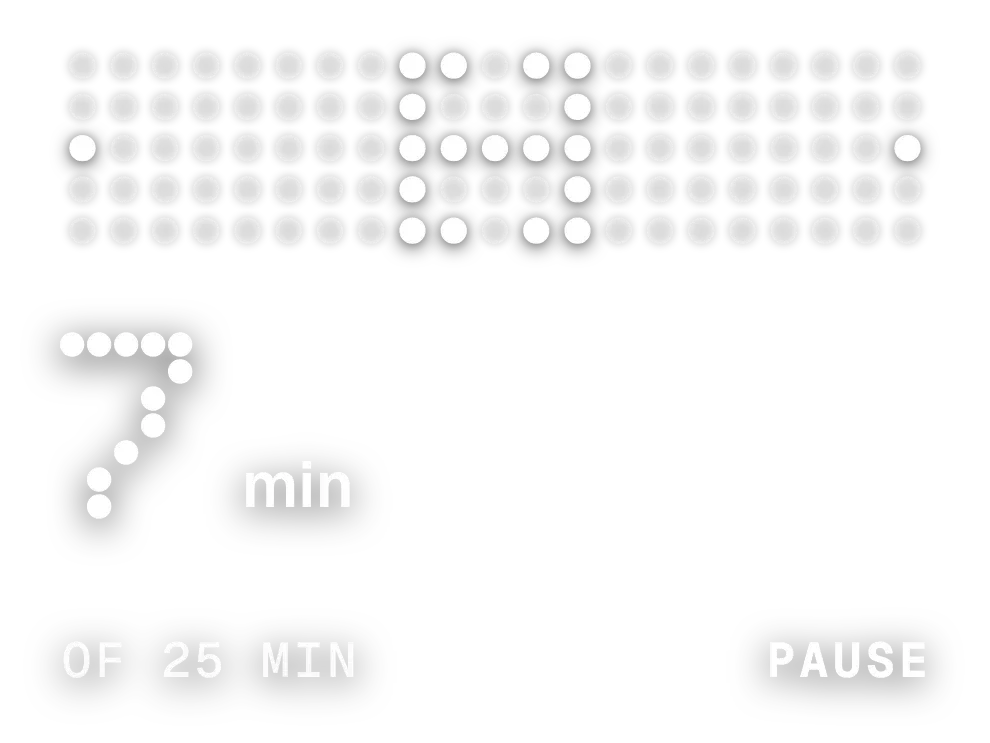
Clasp is a focus timer drawn in white dots on a transparent background. Two dot brackets, one on each side of a grid, move toward the centre as the session runs. Below them, the minutes left appear in large dotted digits next to a small \"min\", with a line at the bottom showing the session length and the next action.
- Size
- 3x2 cells
- Kit
- Nothing
- Shows
- state
- Look
- Dot matrix, monochrome and minimal
- Colours
- Grey and white, dark background
- Looks like
- Nothing widgets
- Good for
- Study, work and deep work
- Android
- 10 or newer
- Needs
- No additional permissions
- Price
- Free
Kiwi is in beta and is not on Google Play yet. Join to request an invitation.
- big-numbers
- black
- controls
- countdown
- dark
- dot-matrix
- dots
- focus
- focus-timer
- grey
- grid
- minimal
- monochrome
- monospace
- nothing
- pause
- pomodoro
- progress
- retro
- time-left
- timer
- typographic
- white
What changes
- Before a session starts, the large number shows the full session length, 25 min to begin with, and the bottom line shows the length on the left and Start on the right.
- While the timer runs, the number counts down in whole minutes and the two dot brackets close in toward the centre. The bottom line reads Of 25 min on the left and Pause on the right.
- Tapping the dots or Pause stops the timer. The word Paused appears beside the minutes, and the bottom right changes to Reset. Tapping the dots again resumes the count.
- When the time is used up, the number is replaced by DONE in large dots, and the bottom right reads Reset. Tapping the dots or Reset returns the timer to the start.
- Tapping Reset while the timer is paused clears the count and shows the full session length again.
Data and settings
- Reads the widget's own saved state: the session length, which is 25 minutes until it is changed, and the running timer.
- Session length is chosen by tapping the length label at the bottom left while the timer is at the start. Each tap moves to the next of 5, 10, 15, 20, 25, 30, 45 and 60 minutes.
Set it up
- Open Clasp in Kiwi, either from its kit or from this page.
- Tap Use.
- Confirm your launcher's prompt to place the widget on your home screen.
Good to know
- The session length can only be changed while the timer is stopped at the start, and only to one of the listed lengths from 5 to 60 minutes.
- The countdown is shown in whole minutes, so it does not show seconds.
Widgets like Clasp
 Sprint StarburstMaterial Expressive
 Hush WinderInstruments
 Sulk SipPlayful
 Pearl RunwayInstruments



