Ray Rascal
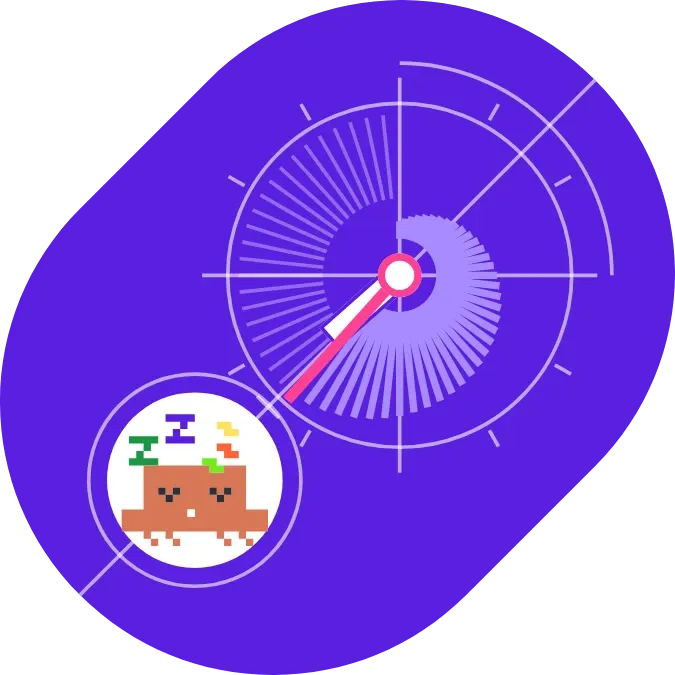
A purple clock on a tilted slab, drawn with a white hour hand and a pink minute hand. Around the centre, lilac rays fan out one per minute as the hour goes on. A pixel creature with sleeping Zs sits in a white circle at the lower left, joined to the clock by thin guide lines.
- Size
- 2x2 cells
- Kit
- Playful
- Shows
- Time and date
- Look
- Bold shapes, watch face and pixel art
- Colours
- Purple, dark background
- Good for
- Daily timekeeping, desk and study
- Android
- 10 or newer
- Needs
- No additional permissions
- Price
- Pro
Kiwi is in beta and is not on Google Play yet. Join to request an invitation.
- analog-clock
- bold
- bright
- clock
- clock-hands
- colourful
- cute
- cute-clock
- dial
- lilac
- mascot
- needle
- orange
- pill
- pink
- pixel
- playful
- progress
- purple
- retro
- ring
- rounded
- sleepy
- watch-face
- white
What changes
- The hour and minute hands follow the current time.
- Each minute that has passed in the current hour adds a lilac ray around the centre, and the rays get longer toward the current minute.
- Minutes still to come in the hour show as faint thin lines, which turn into rays as the minutes pass.
- The rays start over at the top of each hour, when only the first ray is showing.
- The sleepy pixel creature stays the same all day.
- Tapping the widget opens the clock.
Data and settings
- Reads the current time.
- Background colour: Violet, Indigo, Cobalt, Deep teal or Charcoal. Violet is the default.
- Minute hand colour: Pink, Yellow, Mint or Orange. Pink is the default.
- Guide lines can be switched on or off. They are on by default.
- The tap action can be changed. By default a tap opens the clock.
Set it up
- Open the widget in Kiwi, from its kit or from this page.
- Tap Use.
- Confirm your launcher's prompt to place it on your home screen.
Widgets like Ray Rascal
 Periwinkle PunchMaterial Expressive
 Harlequin TickWatch Face