Pip Circuit
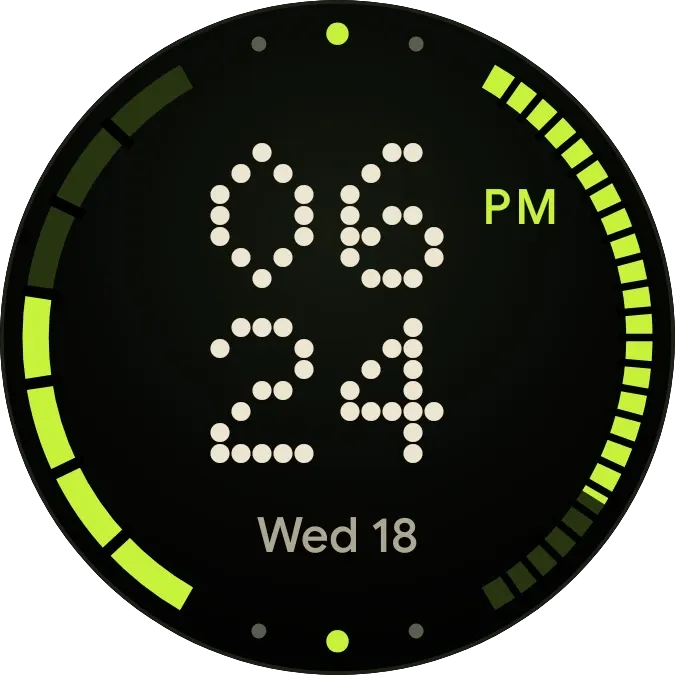
Pip Circuit is a round clock face with a near-black background. The hour sits above the minutes in large cream numerals made of dots, with the weekday and date underneath. Two segmented lime arcs run down the left and right edges, with small dots and pips marking the top and bottom of the rim.
- Size
- 2x2 cells
- Kit
- Watch Face
- Shows
- state, Time and date
- Look
- Watch face, dot matrix and neon
- Colours
- Black, dark background
- Good for
- Daily routine, time checks and desk work
- Android
- 10 or newer
- Needs
- No additional permissions
- Price
- Free
Kiwi is in beta and is not on Google Play yet. Join to request an invitation.
- big-numbers
- black
- bold
- cream
- dark
- date
- day-of-week
- day-progress
- dial
- digital-clock
- dot-matrix
- dots
- lime
- neon
- progress
- retro
- ring
- round
- segmented
- stacked-clock
- time
- typographic
- watch-face
- week
What changes
- The hour, shown with two digits, and the minutes update as the time changes. The hour is on the top row and the minutes are on the row below.
- In 12-hour time, an AM or PM label in lime appears beside the hour. When the time is in 24-hour format, the label is not shown.
- The date line shows the abbreviated weekday and the day number, such as Wed 18, and changes when the date does.
- The arc on the right fills with lime as the day passes. The arc on the left fills in proportion to the day of the week, counted out of seven.
- Tapping the numerals opens the clock. Tapping elsewhere on the face switches between the black face and a lime face with dark numerals.
Data and settings
- Reads the current time for the hour and minute numerals, the AM or PM label and the day arc.
- Reads the current date for the weekday and day number and for the week arc.
- Reads a saved choice between the black and lime looks, which changes each time you tap the face. There is nothing else to set.
Set it up
- Open Pip Circuit in Kiwi, either from its kit or from this page.
- Tap Use.
- Confirm your launcher's prompt to place it on your home screen.