Full Day Agenda
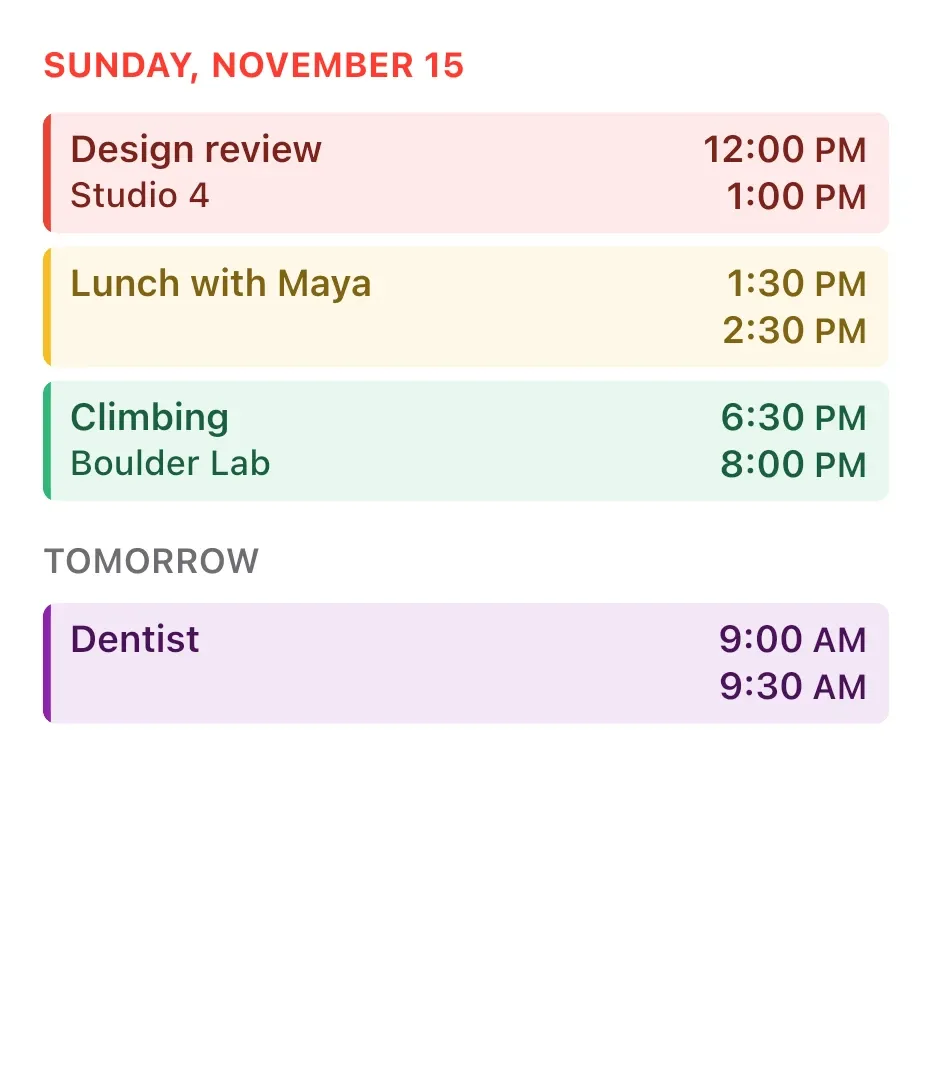
Full Day Agenda lists today's calendar events under the current date, written in red capitals. Each timed event sits in a row tinted with its calendar's colour, with the title and place on the left and the start and end times on the right. A Tomorrow heading below previews the next day.
- Size
- 4x4 cells
- Kit
- iOS & macOS
- Shows
- Calendar
- Look
- Minimal
- Colours
- White and blue, light background
- Looks like
- iPhone widgets
- Good for
- Work and meetings
- Android
- 10 or newer
- Needs
- No additional permissions
- Price
- Free
Kiwi is in beta and is not on Google Play yet. Join to request an invitation.
- agenda
- calendar
- ios
What changes
- Timed events show the title, the location when the event has one, and the start time above the end time.
- All-day events appear as a slim rounded row with a colour dot, the title and the label all-day, instead of times.
- The Tomorrow section appears only when there are events tomorrow. All-day birthday events there show a gift icon in place of the dot.
- When no events are left today, a line reads No more events today.
- Without calendar access, the widget shows Calendar access is off and asks you to allow access in Kiwi.
- Tapping an event opens it. Tapping elsewhere on the widget opens the calendar.
Data and settings
- Reads your calendar events for today and tomorrow, including title, location, start and end times, and calendar colour.
- Reads the current date for the header.
Set it up
- Open the widget in Kiwi, from its kit or from this page.
- Tap Use.
- Confirm your launcher's prompt to place it on your home screen.
Good to know
- It can't show events until calendar access is allowed in Kiwi.
- Only the first few events for today and for tomorrow fit, so a busy day may not list everything.
- Long titles and locations are cut off with an ellipsis rather than wrapped onto another line.
Widgets like Full Day Agenda
 Broadside DayNothing



