Tint Agenda
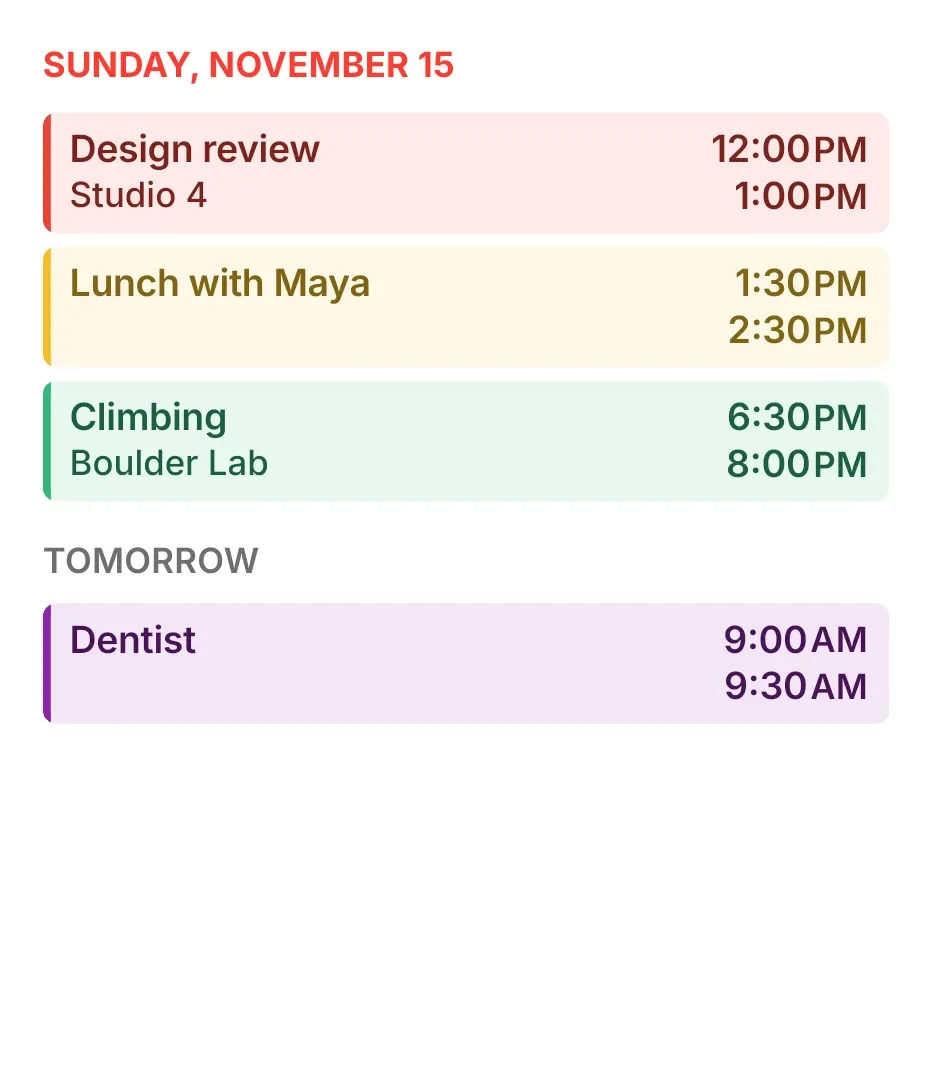
Tint Agenda lists today's calendar events under the date in red capitals. Each event is a pale strip in its calendar's colour with a bold left edge, with the title and place on the left and the start and end times on the right. Tomorrow's first events follow under a Tomorrow label.
- Size
- 4x4 cells
- Kit
- iOS & macOS
- Shows
- Calendar
- Look
- Minimal, typographic and pastel
- Colours
- White and pink, light background
- Looks like
- iPhone widgets
- Good for
- Work, study and daily planning
- Android
- 10 or newer
- Needs
- No additional permissions
- Price
- Free
Kiwi is in beta and is not on Google Play yet. Join to request an invitation.
- agenda
- apple
- at-a-glance
- bright
- calendar
- clean
- color-coded
- day-planner
- events
- green
- list
- minimal
- next-event
- pastel
- purple
- red
- schedule
- time
- today
- tomorrow
- typographic
- white
- yellow
What changes
- It shows up to four of today's upcoming events, each as a coloured strip with its title, its place if it has one, and its start and end times stacked on the right.
- An all-day event appears as a slim rounded row with a colour dot, its title, and the words all-day, instead of a timed strip.
- Under the Tomorrow label it shows the first two events of tomorrow. The label and strips are left out when tomorrow has no events.
- When no events are left today, it shows the line No more events today.
- A tomorrow all-day event from a birthday calendar shows a small gift icon in place of the colour dot.
- Tapping an event opens that event. Tapping elsewhere on the widget opens your calendar.
Data and settings
- It reads your calendar: event titles, places, start and end times, all-day status and the colour of each event's calendar.
- The date at the top follows today's date. There is nothing to set.
Set it up
- Open the widget in Kiwi, from its kit or from this page.
- Tap Use.
- Confirm your launcher's prompt to place it.
Good to know
- Events appear only once calendar access is allowed in Kiwi. Until then the widget shows a note that calendar access is off.
- It shows at most four of today's events and two of tomorrow's, so a busier day will not be listed in full.
- Long titles and places stay on one line and are cut off with an ellipsis.
- It lists today and tomorrow only.
Widgets like Tint Agenda
 Window SeatBento
 BloomgridMaterial You



