Tapeline Day
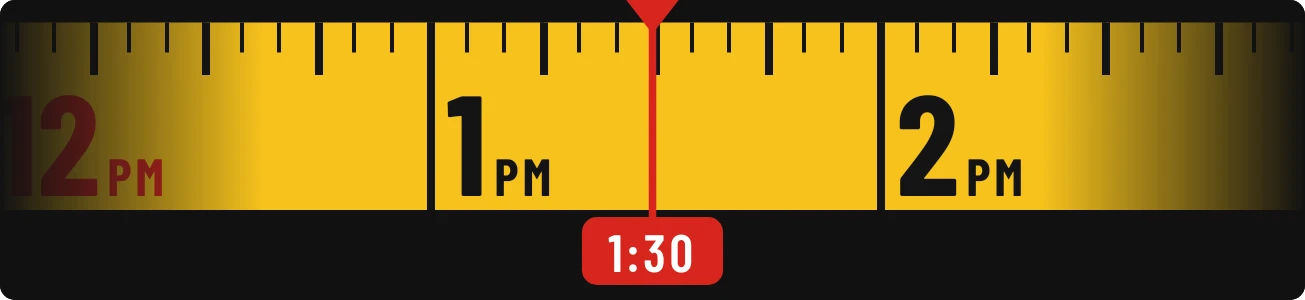
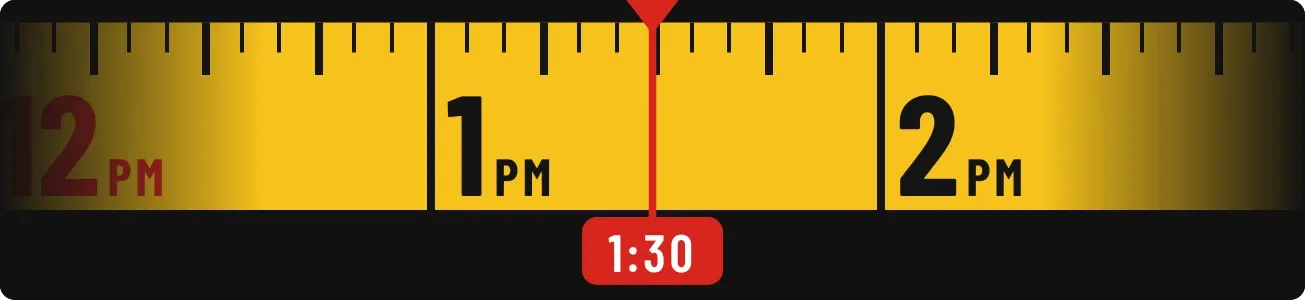
Tapeline Day looks like a yellow measuring tape laid across a dark rounded strip. Black hour numerals sit along the tape, with small marks between them, and a thin red line with a notch at the top marks the present moment. A red tag under the line shows the current time.
- Size
- 4x1 cells
- Kit
- Instruments
- Shows
- Time and date
- Look
- Hardware, bold shapes and typographic
- Colours
- Black, yellow and brown, dark background
- Good for
- Work, workshop and planning the day
- Android
- 10 or newer
- Needs
- No additional permissions
- Price
- Free
Kiwi is in beta and is not on Google Play yet. Join to request an invitation.
- at-a-glance
- big-numbers
- black
- bold
- bright
- clock
- dark
- day-timeline
- digital-clock
- minimal
- progress
- red
- ruler
- tape
- tape-measure
- time
- time-of-day
- typographic
- warm
- yellow
What changes
- The tape slides sideways as the day passes, so the red line always points at the current moment on the tape.
- The red tag under the line shows the current time as text.
- Hour numerals run through the whole day. Midnight, 6 in the morning, noon and 6 in the evening are in red instead of black.
- Hours appear as 00 to 23 when the 24-hour clock is in use. Otherwise they appear as 1 to 12 with a small AM or PM.
- Between the numerals, small marks show every five minutes, with longer marks at the quarter hours and the hours.
- The left and right ends of the tape fade into the dark background. Tapping the widget opens the clock.
Data and settings
- Reads the current time, and whether it is shown in 12-hour or 24-hour form.
- Nothing to set.
Set it up
- Open Tapeline Day in Kiwi, either from its kit or from this page.
- Tap Use.
- Confirm your launcher's prompt to place the widget on your home screen.
Good to know
- Only a few hours of the tape are in view at once. Other hours of the day are off to the left or right until the tape slides to them.
Widgets like Tapeline Day
 Scrap SundayPlayful
 Pip CircuitWatch Face
 RimrunnerWatch Face
 Stencil TempoWatch Face