Windsleeve
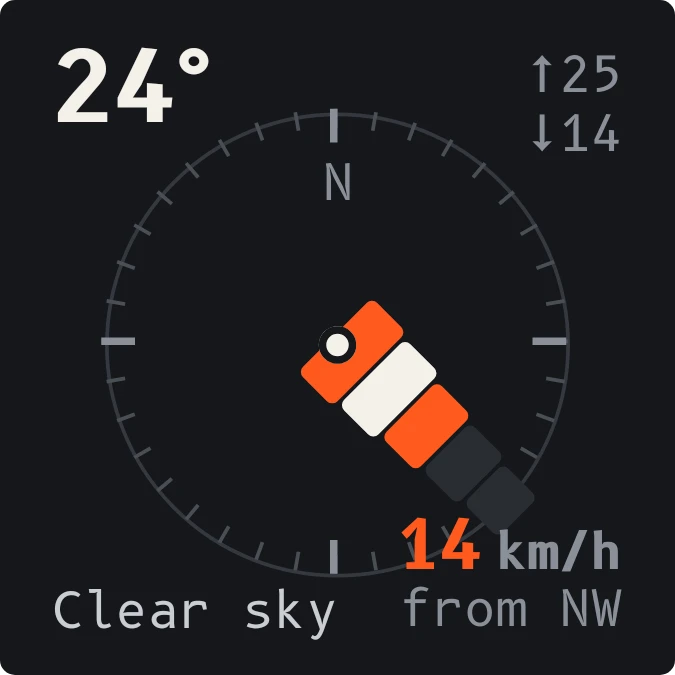
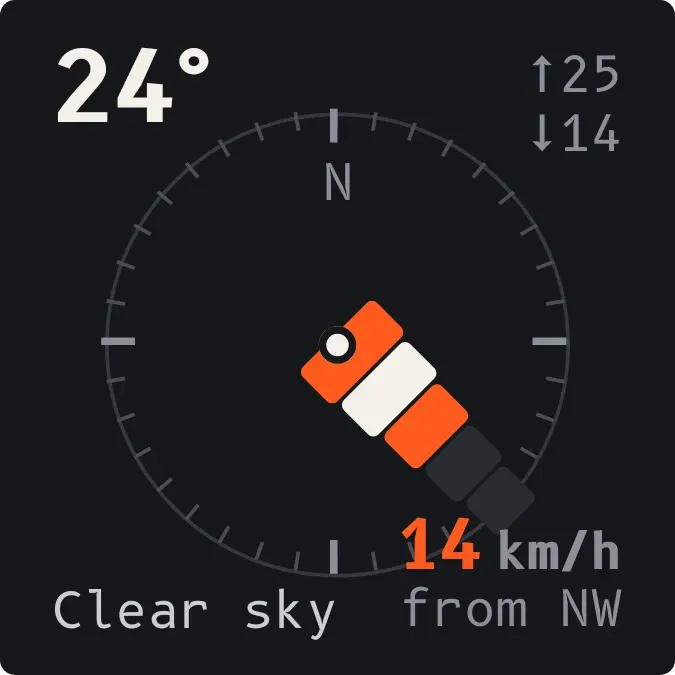
Windsleeve shows the weather on a dark rounded tile with a compass ring. A windsock seen from above sits in the middle of the ring and points toward where the wind is coming from. Temperature, today's high and low, the sky condition and the wind speed sit around it in the corners.
- Size
- 2x2 cells
- Kit
- Instruments
- Shows
- Weather
- Look
- Minimal, typographic and monochrome
- Colours
- Black, dark background
- Good for
- Sailing, kite flying and cycling
- Android
- 10 or newer
- Needs
- No additional permissions
- Price
- Free
Kiwi is in beta and is not on Google Play yet. Join to request an invitation.
- 2x2
- analog
- at-a-glance
- big-numbers
- black
- bold
- calm
- clear-sky
- compass
- dark
- dial
- forecast
- grey
- minimal
- monochrome
- orange
- temperature
- typographic
- weather
- weather-now
- white
- wind
- wind-direction
- wind-speed
- windsock
What changes
- The sock turns around the ring as the wind direction changes. Its wide end sits at the centre mast and points toward the compass bearing the wind comes from.
- The sock has five segments that light up as the wind picks up, roughly one for every three knots. Lit segments alternate orange and cream, and unlit ones stay dark grey.
- In very light wind, below about 1.5 knots, none of the segments light up. Past about 13.5 knots all five are lit, and the speed figure keeps counting.
- The wind speed is shown in orange with its unit, and below it a line such as "from NE" gives the compass direction the wind comes from.
- The temperature is large at the top left, with the day's high and low at the top right and the sky condition, such as Clear sky, at the bottom left.
- When no weather is available, the compass and sock are replaced by a short message, such as No city set, and the line "The sock hangs still".
Data and settings
- Reads weather: current temperature, today's high and low, sky condition, wind speed, wind direction and compass point.
- Wind speed is shown in the unit the weather data gives: knots, km/h, mph or m/s. The sock's segments scale to that unit.
- Needs a city to read weather for.
Set it up
- Open the widget in Kiwi, either from its kit or from this page.
- Tap Use.
- Confirm your launcher's prompt to place it on the home screen.
- If the widget shows No city set, choose a city so it can read the weather.
Good to know
- It needs a city set before it can show anything. Without one it shows only a message.
- Weather and wind come from an online source, so it needs an internet connection to update.
- The sock has five segments, so it can't show differences in wind speed above about 13.5 knots. The number beside it still shows the exact speed.
- The compass ring labels only north. Other directions are read from the sock's position and the "from" line.
Widgets like Windsleeve
 HeatbeadsNothing
 ThunderheadScenes
 SandglowScenes
 Last LightScenes