Dusk Zip
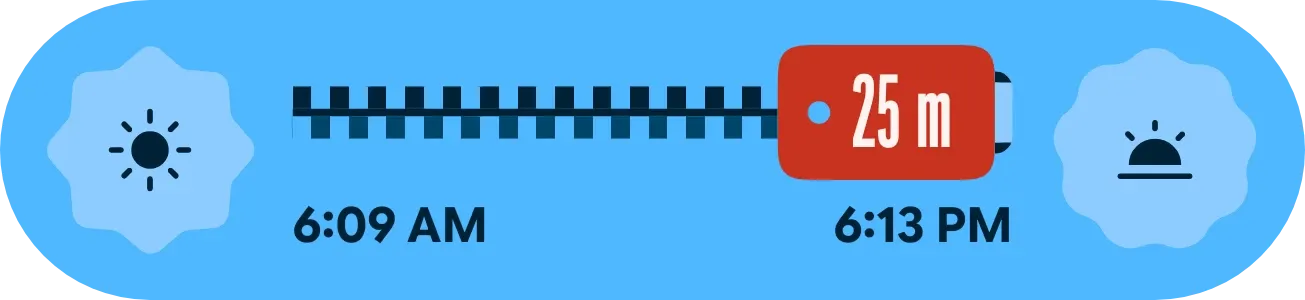
Dusk Zip is a wide pill-shaped widget on a light blue background that shows how much daylight is left. A red zipper pull with a rivet slides along a dark zipper track, with a sun icon at the left end and a sunset icon at the right. The pull shows the time remaining, and the sunrise and sunset times sit underneath.
- Size
- 4x1 cells
- Kit
- Material Expressive
- Shows
- Sky
- Look
- Bold shapes, colourful and typographic
- Colours
- Blue, light background
- Looks like
- Pixel widgets
- Good for
- Evening walks, outdoor photography and hiking
- Android
- 10 or newer
- Needs
- No additional permissions
- Price
- Free
Kiwi is in beta and is not on Google Play yet. Join to request an invitation.
- blue
- bold
- bright
- countdown
- day-progress
- daylight
- material-expressive
- pill
- playful
- progress-bar
- pull-tab
- red
- scalloped
- sun
- sunrise
- sunset
- sunset-countdown
- time-left
- zipper
What changes
- During the day, the pull shows the time left until sunset, such as 25 m or 2 h 10 m.
- As the day goes on, the closed teeth behind the pull grow and the dashed open gap ahead of it shrinks.
- The sunrise time sits under the left end of the track and the sunset time under the right end.
- After sunset, the track is fully closed. The pull shows the next sunrise time, with the note Next sunrise and the time left in the form in 9 h 15 m, and the right icon becomes a moon.
- When Kiwi has no city, the widget shows a red location icon with the text Set a city in Kiwi and the note Needed for sunrise and sunset.
- Tapping the widget refreshes its sun data. When it is asking for a city, tapping it opens Kiwi.
Data and settings
- Reads sunrise and sunset times from the sky data for your city.
- Reads the time left until the next sunset or sunrise, and how far through the daylight hours it is.
- Uses the city you set in Kiwi to work out those times.
Set it up
- Open the widget in Kiwi, either from its kit or from this page.
- Tap Use.
- Confirm your launcher's prompt to place it.
- If the widget shows Set a city in Kiwi, set a city in Kiwi so it can show sunrise and sunset.
Good to know
- It needs a city set in Kiwi before it can show sunrise, sunset or the countdown.
- Without a city, it shows the Set a city in Kiwi message instead of the zipper track.
- The times shown follow the city you choose, so they will not match your location if the city is different.
Widgets like Dusk Zip
 Drowsy DuskWatch Face
 Sunflower GrinPlayful
 StreaklinePlayful
 Sky SeamPlayful



