Dogear Nib
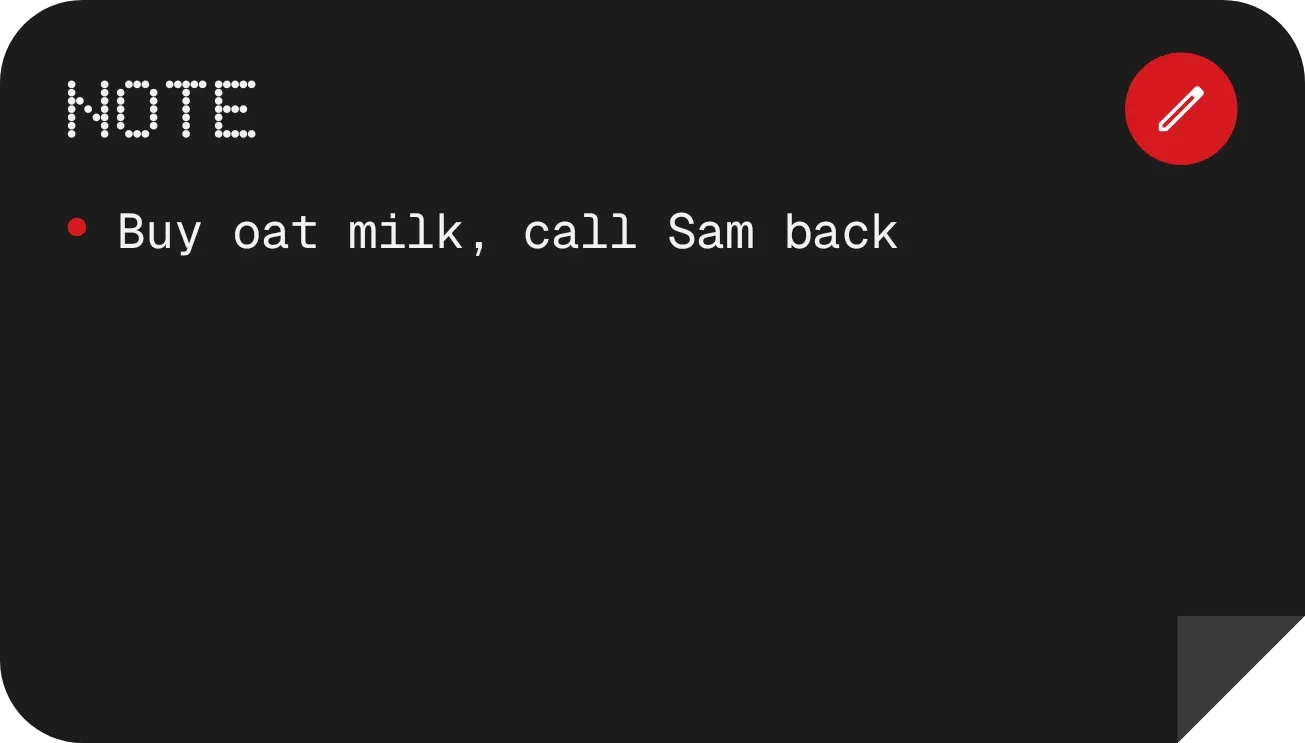
Dogear Nib is a black note card with a folded bottom-right corner. NOTE is written across the top in a dot-matrix typeface, with a round red pen button at the right. Your note text sits below it, next to a small red bullet.
- Size
- 4x2 cells
- Kit
- Nothing
- Shows
- Notes and to-dos
- Look
- Dot matrix, minimal and typographic
- Colours
- Black, dark background
- Looks like
- Nothing widgets
- Good for
- Shopping list, reminders and quick notes
- Android
- 10 or newer
- Needs
- No additional permissions
- Price
- Free
Kiwi is in beta and is not on Google Play yet. Join to request an invitation.
- black
- bold
- checklist
- cozy
- dark
- dot-matrix
- dots
- fold
- memo
- minimal
- minimal-typography
- monochrome
- monospace
- moody
- note
- paper
- pen
- red
- reminder
- rounded
- sticky-note
- text
- to-do-list
- typography
- white
What changes
- A short note appears next to the red bullet in regular-sized text, up to four lines.
- A long note appears in smaller text so that more of it fits, up to six lines.
- When there is no note, the card shows the grey line "Tap to write something down" in place of the text.
- Tapping the card opens the note for editing.
Data and settings
- Reads the text of your note and shows it on the card.
Set it up
- Open Dogear Nib in Kiwi, either from its kit or from this page.
- Tap Use.
- Confirm your launcher's prompt to place the widget on your home screen.
Good to know
- A note longer than the lines available is cut off, so only the start of it shows on the card.
- The card shows the text of one note at a time.
Widgets like Dogear Nib
 Mint ScrawlMaterial Expressive
 DosemeterTactile Hardware



