Mint Scrawl
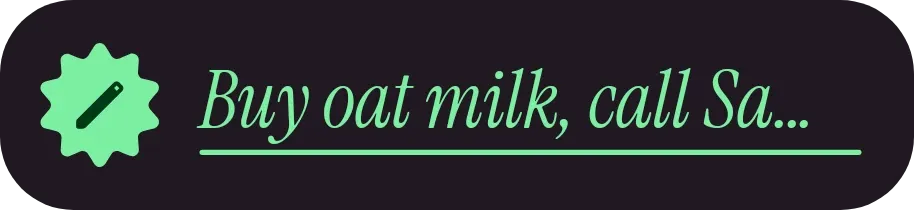
Mint Scrawl is a dark pill-shaped bar with a mint scalloped badge holding a pencil icon on the left. Your note sits beside it in large italic serif type, in mint green, with a thin mint underline beneath the text.
- Size
- 4x1 cells
- Kit
- Material Expressive
- Shows
- Notes and to-dos
- Look
- Typographic, minimal and bold shapes
- Colours
- Black, dark background
- Looks like
- Pixel widgets
- Good for
- Shopping reminders, quick notes and daily reminders
- Android
- 10 or newer
- Needs
- No additional permissions
- Price
- Free
Kiwi is in beta and is not on Google Play yet. Join to request an invitation.
- black
- dark
- green
- handwritten
- italic
- minimal
- minimal-typography
- mint-green
- note
- pill
- reminder
- rounded
- serif
- sticker
- text
- typography
What changes
- A short note appears on a single line in large italic serif, with the mint underline directly below it.
- When a note runs long, the text shrinks and wraps onto up to two lines so more of it fits.
- When there is no note, it shows the line "Tap to write a note" in a muted grey-purple instead of mint.
- Tapping the widget opens the note for editing.
- The badge, bar colour and underline stay the same whatever the note says.
Data and settings
- Reads your note and shows its text.
- The note is the only thing you set, and tapping the widget lets you edit it.
Set it up
- Open the widget in Kiwi, either from its kit or from this page.
- Tap Use.
- Confirm your launcher's prompt to place it on your home screen.
Good to know
- A note that is too long for two lines of the smaller text is cut off with an ellipsis, so only part of it shows.
- A short note that is wider than the bar is trimmed on its single line with an ellipsis.
- It shows one note at a time, so it only displays the text of your current note.
Widgets like Mint Scrawl
 Dogear NibNothing
 DayslideInstruments
 DosemeterTactile Hardware
 Chalk & CoalNothing



