Dosemeter
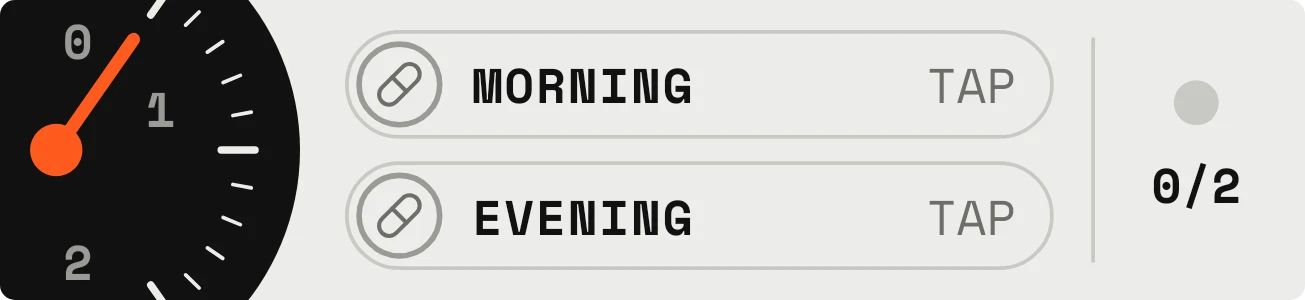
Dosemeter is a medication tracker for two daily doses. A black half-round gauge on the left has an orange needle and a scale marked 0, 1 and 2. Beside it are two outlined rows, Morning and Evening, and on the right a small LED sits above a count such as 0/2.
- Size
- 4x1 cells
- Kit
- Tactile Hardware
- Shows
- state
- Look
- Hardware, minimal and typographic
- Colours
- White and black, light background
- Looks like
- Teenage Engineering widgets
- Good for
- Morning routine, evening routine and medication
- Android
- 10 or newer
- Needs
- No additional permissions
- Price
- Free
Kiwi is in beta and is not on Google Play yet. Join to request an invitation.
- 4x1
- analog
- black
- blue
- checklist
- counter
- dark
- dial
- gauge
- green
- grey
- habit
- habit-tracker
- hardware
- medication
- medicine-reminder
- minimal
- monospace
- orange
- pills
- progress
- retro
- tactile
- tap-counter
- teenage-engineering
What changes
- Each row shows a pill icon and the word TAP until you tap it. Tapping marks that dose as taken, and tapping a taken row again puts it back to not taken.
- A taken row swaps the pill icon for a white check on a coloured disc, blue for Morning and orange for Evening. The TAP label becomes TAKEN in green.
- The needle points at 0 when neither dose is taken, at 1 when one is taken, and at 2 when both are taken.
- The count on the right reads 0/2, 1/2 or 2/2 to match the number of doses taken.
- The LED is grey until both doses are taken. Then it turns green and the count reads 2/2.
Data and settings
- Reads whether the Morning dose and the Evening dose are marked taken, based on your taps on the widget.
- There is nothing to configure. The two rows are labelled Morning and Evening.
Set it up
- Open Dosemeter in Kiwi, either from its kit or from this page.
- Tap Use.
- Confirm your launcher's prompt to place it on your home screen.
Good to know
- It tracks two doses a day, labelled Morning and Evening. The count never goes above 2.
- A dose counts as taken only because you tapped it. The widget can't tell whether you actually took the pill.
- Each row shows only TAP or TAKEN. It doesn't show a time, a medication name or a dose amount.
Widgets like Dosemeter
 Pill ParadePlayful
 LockstepMaterial Expressive
 TicktideMaterial You
 SipdomeMaterial Expressive