Cloud Morse
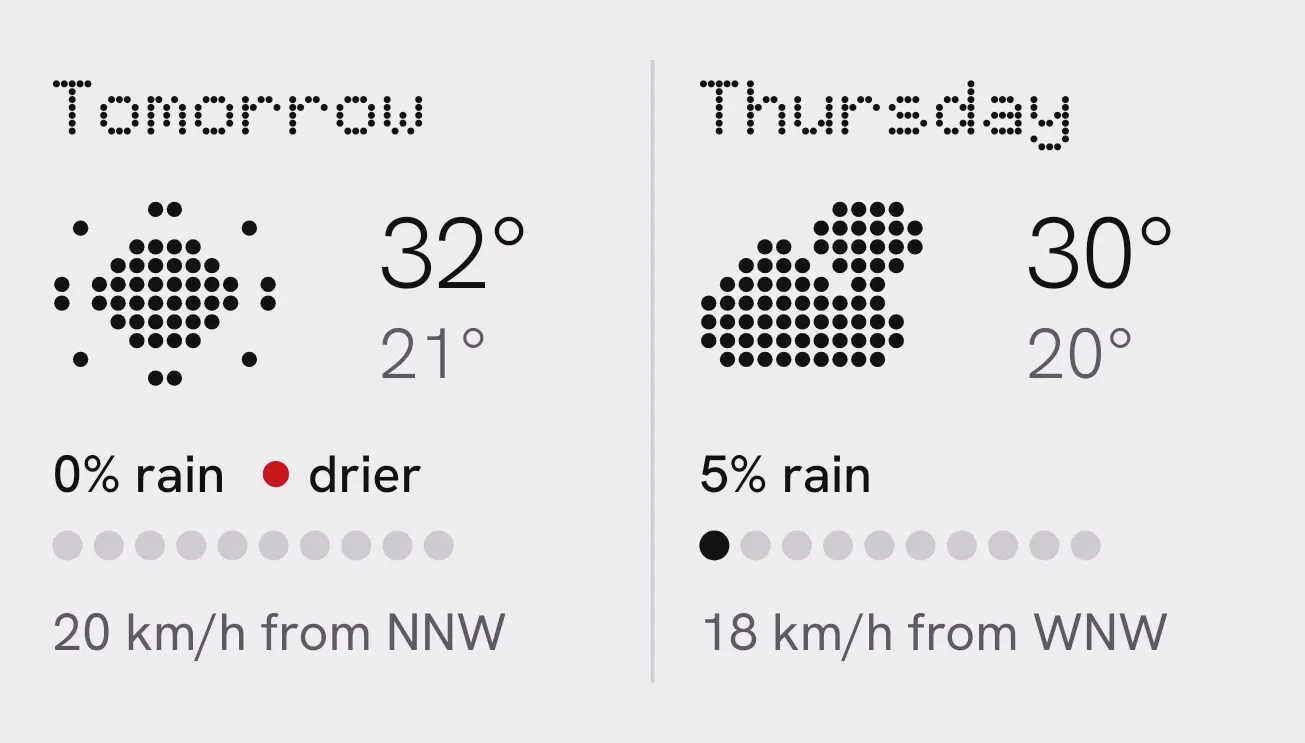
Cloud Morse puts two forecast days side by side on a pale grey background, separated by a thin line. Each day has its name, a dot-matrix weather picture, a high and low temperature, a rain chance with a row of ten dots, and the wind. The day with the lower rain chance gets a small red mark and the word drier.
- Size
- 4x2 cells
- Kit
- Nothing
- Shows
- Weather
- Look
- Dot matrix, minimal and typographic
- Colours
- White and grey, light background
- Looks like
- Nothing widgets
- Good for
- Morning routine, planning outings and commuting
- Android
- 10 or newer
- Needs
- No additional permissions
- Price
- Free
Kiwi is in beta and is not on Google Play yet. Join to request an invitation.
- big-numbers
- black
- clouds
- day-of-week
- dot-matrix
- dots
- forecast
- grey
- light
- minimal
- monochrome
- nothing
- percentage
- rain
- red
- sun
- temperature
- two-day-forecast
- typographic
- weather
- wind
What changes
- Each column shows a day name, such as Tomorrow or Thursday, with a dot-matrix picture for that day's sky: sun, sun with cloud, cloud, rain, snow, fog or thunder.
- The high sits above the low. The high is in black with an up arrow, and the low is in grey with a down arrow.
- The rain chance is written as a percentage. A row of ten dots fills in black in steps of ten, so 0% leaves every dot grey and 5% fills the first one.
- A red dot and the word drier appear next to the rain chance of the day with the lower chance. If both days match, neither gets the mark.
- The wind line gives the speed, its unit and the compass direction it blows from, such as 20 km/h from NNW.
- Without a forecast, a grey cloud takes the place of the two days. It says No city set, Looking ahead while loading, or No forecast with a prompt to tap to try again.
Data and settings
- Reads the weather forecast for your city: the next two days' names, sky conditions, highs and lows, rain chances, wind speeds and wind directions.
- The city comes from Kiwi. Until one is picked, the widget asks you to choose it there.
Set it up
- Open Cloud Morse in Kiwi, either from its kit or from this page.
- Tap Use.
- Confirm your launcher's prompt to place the widget.
- If the widget says No city set, tap it and pick a city in Kiwi so it can load the forecast.
Good to know
- It needs an internet connection to load the forecast.
- It compares only two days, so it doesn't show hourly or longer-range forecasts.
- It shows no forecast until a city is set, and the widget says so.
- The drier mark compares rain chance only. It says nothing about temperature or wind.
Widgets like Cloud Morse
 WindsleeveInstruments
 ThunderheadScenes
 Rain OutlookiOS & macOS
 Weather RainiOS & macOS



