Pacebound
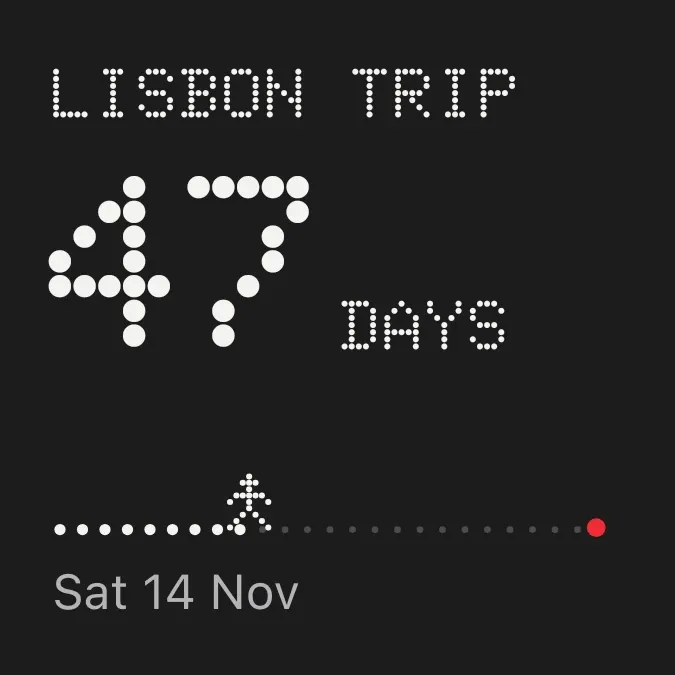
Pacebound counts down the days to something you are looking forward to, such as a trip. The name sits at the top in white dot-matrix capitals, with the number of days in large dots below it on a charcoal background. A dotted path runs along the bottom, with a small dotted walker moving toward a red dot at the end and the date underneath.
- Size
- 2x2 cells
- Kit
- Nothing
- Shows
- Countdowns
- Look
- Dot matrix, typographic and minimal
- Colours
- Black, dark background
- Looks like
- Nothing widgets
- Good for
- Travel, vacation planning and trip anticipation
- Android
- 10 or newer
- Needs
- No additional permissions
- Price
- Free
Kiwi is in beta and is not on Google Play yet. Join to request an invitation.
- big-numbers
- black
- countdown
- dark
- date-display
- day-of-week
- days-to-go
- dot-matrix
- dots
- grey
- minimal
- nothing
- playful
- progress-bar
- red
- retro
- time-left
- travel
- trip-countdown
- typographic
- walking-figure
- white
What changes
- While the date is ahead, the widget shows the number of days left with the word days next to it. When one day is left, the word changes to day.
- From 100 days up, the number is drawn smaller so the three digits fit.
- On the day itself, the number is replaced by a short message in red, such as Today.
- The walker moves along the path as the date gets closer. Dots behind it are white and dots ahead of it are dim grey. The red dot marks the end.
- With no countdown set, the widget shows Add a countdown and the line Tap to pick a day in Kiwi. The walker and the white dots are hidden, and only the dim path and red dot remain.
Data and settings
- Reads a countdown: its name, its date and how many days are left.
- You choose the name shown at the top and the day you are counting down to.
- The date appears under the path as a weekday, day and month, for example Sat 14 Nov.
Set it up
- Open the widget in Kiwi, either from its kit or from this page.
- Choose the day you are counting down to and give the countdown a name.
- Tap Use.
- Confirm your launcher's prompt to place the widget on your home screen.
Good to know
- It needs a countdown with a day chosen. Until then it only shows the prompt to add one.
- It counts in whole days. It does not show hours or minutes.
- A long name is cut off after two lines.
- It shows one countdown at a time.
Widgets like Pacebound
 Pearl RunwayInstruments
 TidecountMaterial You
 Prism StubGlass
 Filament DaysInstruments



