Cleft Candy
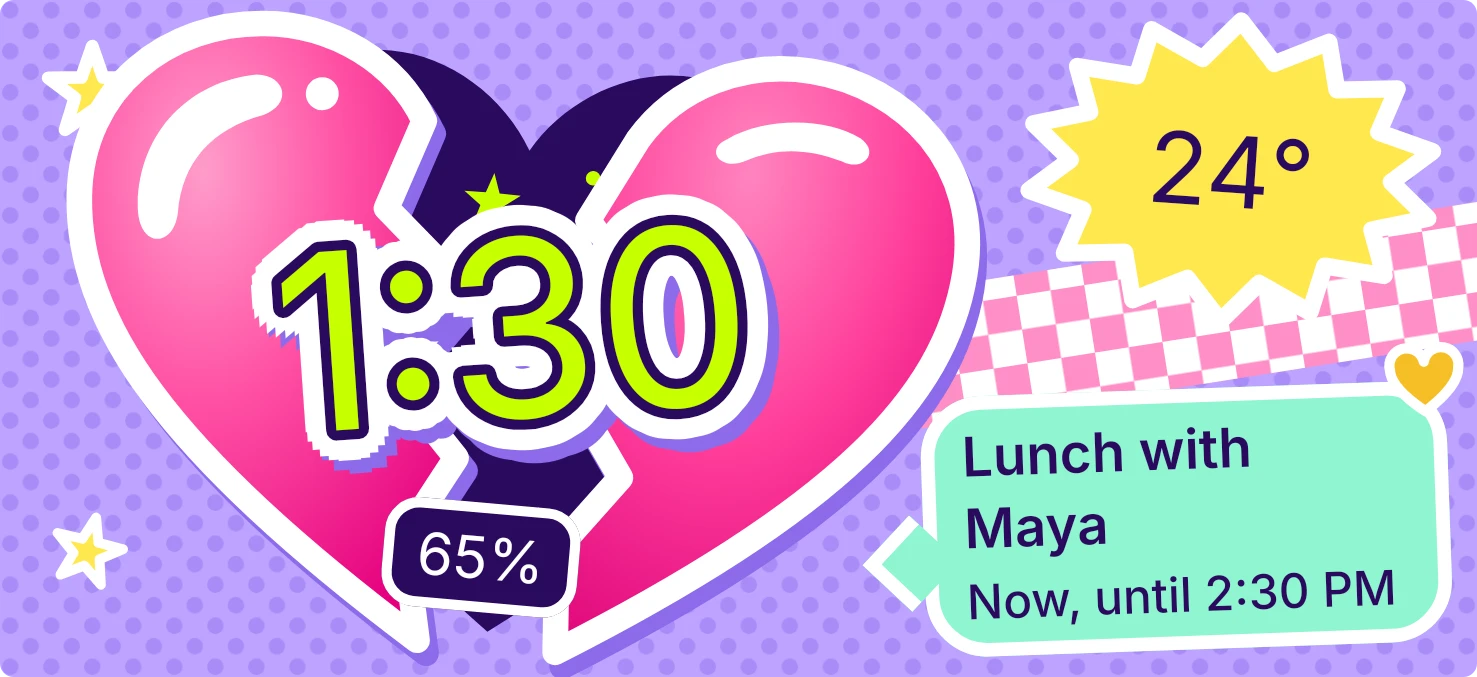
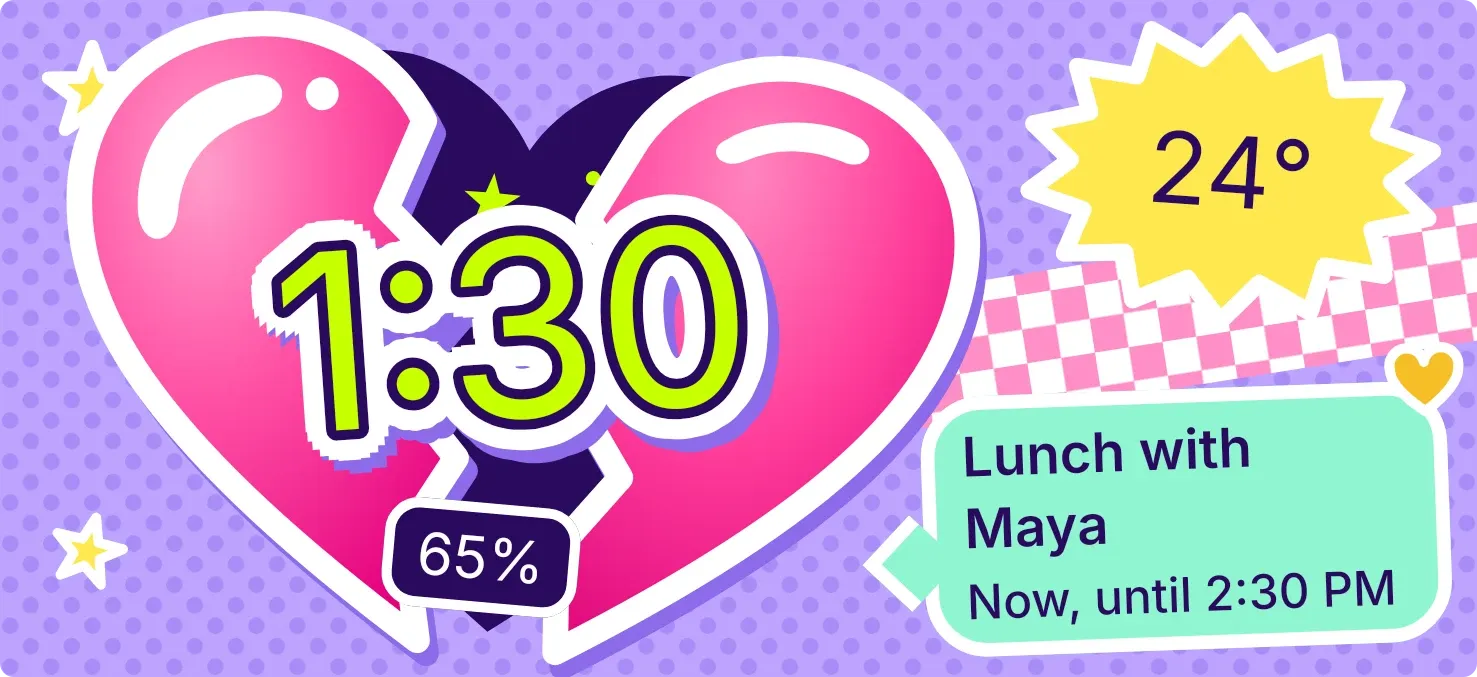
Cleft Candy shows a glossy pink heart split down the middle on a lilac background with a dot pattern, with the time in big lime letters laid across the crack like a sticker. A yellow badge shows the temperature, and a mint speech bubble shows your next calendar event. A small dark tag shows the battery percentage.
- Size
- 5x2 cells
- Kit
- Playful
- Shows
- Battery, Calendar, Time and date, Weather
- Look
- Stickers, kawaii and Y2K
- Colours
- Purple and pink, light background
- Good for
- Work day, meetings and daily check
- Android
- 10 or newer
- Needs
- READ_CALENDAR (optional)
- Price
- Pro
Kiwi is in beta and is not on Google Play yet. Join to request an invitation.
- battery
- battery-time-left
- big-numbers
- bright
- calendar
- cartoon
- checkered
- clock
- colourful
- cute
- die-cut
- digital-clock
- dots
- harajuku
- heart
- kawaii
- lime
- next-event
- pink
- playful
- purple
- sticker
- temperature
- weather
- yellow
What changes
- The two halves of the heart move apart and tilt further as the battery level drops, so the gap is smallest on a full battery.
- The battery tag shows the percentage, with a lightning bolt beside it while the phone is charging. When the battery is low, the tag turns lime and the bolt is not shown.
- The weather badge changes with conditions: a yellow burst for a sunny day, a pale oval with dots at night, and a blue cloud otherwise, with drops for rain, dots for snow, a bar for fog or a bolt for a storm.
- The speech bubble shows the next event's title, with a heart pin in the event's calendar colour. It reads Now, until the end time for an event in progress, the day and all day for all-day events, or the day and start time.
- With calendar access but nothing coming up, the bubble reads Free all week and Tap to plan.
- Without a city the badge reads Set a city in Kiwi. While loading it reads Finding your sky, and on failure it reads No weather, tap to retry. Tapping the weather badge refreshes it.
Data and settings
- Reads the battery level and whether the phone is charging.
- Reads the current time and shows it as the large lime digits.
- Reads the weather for your chosen city: the temperature and the conditions, including whether it is day or night.
- Reads your calendar for the next event: its title, day, time, end time, all-day status and calendar colour.
- The city for the weather is the one thing you set.
Set it up
- Open the widget in Kiwi, from its kit or from this page.
- Tap Use.
- Confirm your launcher's prompt to place the widget on your home screen.
- Choose a city in Kiwi when the widget shows Set a city in Kiwi, so the temperature appears.
- To see your next event, allow calendar access when the widget asks Let Kiwi see your calendar. This permission is optional.
Permissions
- Calendar (optional: it works without it). Your next events come from the calendar on this phone. Only the times and titles of what's coming up; never sent anywhere, and never changed.
Good to know
- The temperature and weather icon need an internet connection and a chosen city. Without them the badge shows a message instead.
- Events appear only after you allow calendar access. Until then the bubble asks Let Kiwi see your calendar.
- The speech bubble shows only the next event, and a long title is cut off after two lines.
- The time and battery tag work without calendar access or a city.
Widgets like Cleft Candy
 Jelly GlanceGlass
 Lime PinstripeMaterial Expressive
 Wake TicketMaterial Expressive
 Sherbet GridBento