Tick Blob
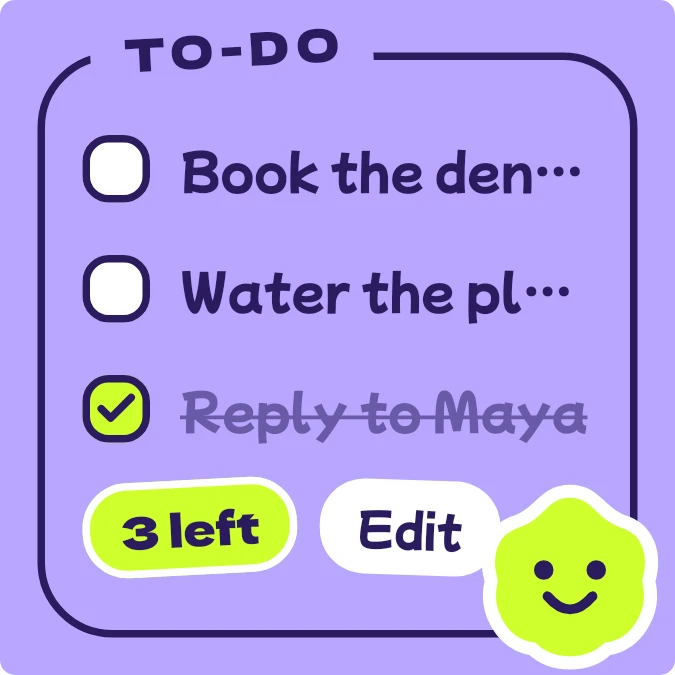
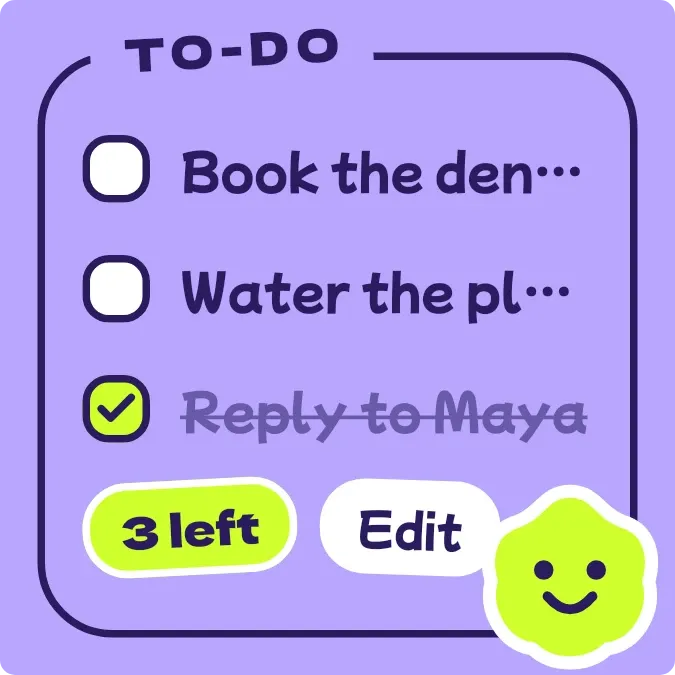
Tick Blob is a to-do list on a purple background, inside an outlined frame with a tilted TO-DO label on its top edge. It lists up to three tasks with checkboxes, a lime chip counting how many are left, and an Edit pill. A lime blob mascot sits in the corner and changes its face as tasks get ticked.
- Size
- 2x2 cells
- Kit
- Playful
- Shows
- Notes and to-dos
- Look
- Stickers, kawaii and bold shapes
- Colours
- Purple, light background
- Good for
- Daily tasks, errands and study
- Android
- 10 or newer
- Needs
- No additional permissions
- Price
- Free
Kiwi is in beta and is not on Google Play yet. Join to request an invitation.
- bold
- cartoon
- checkboxes
- checklist
- colourful
- counter
- cute
- harajuku
- kawaii
- lilac
- lime
- mascot
- playful
- purple
- rounded
- sticker
- tasks
- tasks-left
- to-do
- todo-list
What changes
- Each task row has an empty white box. Tapping a row ticks it: the box turns lime with a check mark and the task text is struck through and faded. Tapping again unticks it.
- The lime chip shows how many tasks are left, for example 3 left, and updates as tasks are ticked or unticked.
- With more than four tasks left, the blob looks worried, with slanted brows, a wavy mouth and a sweat drop. With four or fewer left, it smiles.
- When every task is ticked, the list is replaced by the words All done and a Clear ticked pill. The blob has closed happy eyes, an open mouth and pink and blue confetti.
- Tapping Clear ticked removes the ticked tasks from the list.
- With no tasks, it shows Nothing to do and Tap to add something. The blob sleeps with closed eyes and small z letters. Tapping the label or the Edit pill also opens the list for editing.
Data and settings
- Reads the to-do list from your notes: each task's text and whether it is ticked.
- You tick and untick tasks by tapping their rows on the widget.
- You can edit the list by tapping the TO-DO label or the Edit pill, or by tapping the empty message when there are no tasks.
Set it up
- Open Tick Blob in Kiwi, either from its kit or from this page.
- Tap Use.
- Confirm your launcher's prompt to place the widget on your home screen.
Good to know
- Only the first three tasks are listed, so the left chip can count more tasks than you can see.
- Long task names are cut off with an ellipsis rather than wrapped onto a second line.
- The blob's face depends on how many tasks are left, so a long list keeps it worried until the count drops to four.
Widgets like Tick Blob
 TicktideMaterial You
 LockstepMaterial Expressive
 HatchmarkMaterial You
 Kindle RowScenes