Moon Pearl
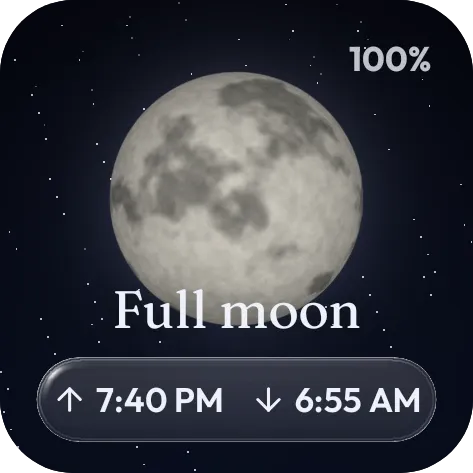
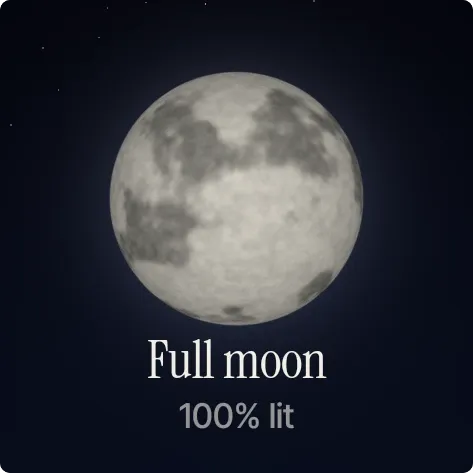
Moon Pearl shows the moon as a grey-cratered disc against a dark night sky. Below it, the current phase name is set in serif type, with the percentage of the moon that is lit underneath in smaller, dimmer text. In the picture it reads Full moon, 100% lit.
- Size
- 2x2 cells
- Kit
- Scenes
- Shows
- Sky
- Look
- Minimal, 3D and typographic
- Colours
- Black and grey, dark background
- Good for
- Stargazing, bedtime and night routine
- Android
- 10 or newer
- Needs
- No additional permissions
- Price
- Pro
Kiwi is in beta and is not on Google Play yet. Join to request an invitation.
- 2x2
- black-and-white
- calm
- dark
- dreamy
- full-moon
- glow
- grey
- live
- lunar
- minimal
- moody
- moon
- moon-illumination
- moon-phase
- night
- photo
- serif
- sky
- space
- typographic
What changes
- The phase name and the percent lit change as the moon moves through its phases.
- The moon disc is drawn to match the percent lit, so the lit part grows and shrinks over the month.
- At full moon the whole disc is lit and the text reads Full moon, 100% lit.
- Tapping the widget opens the clock.
Data and settings
- Reads the moon's current phase and illumination from the sky.
- Sky: choose Night, Indigo or Ember for the background and text colours.
- Phase type: choose Classic, Soft or Modern for the font of the phase name.
- Corners: set the corner rounding from 0 to 40 in steps of 2.
Set it up
- Open Moon Pearl in Kiwi, either from its kit or from this page.
- Tap Use.
- Confirm your launcher's prompt to place it on your home screen.
Good to know
- Near a new moon, very little of the disc is lit, so the moon is hard to see against the dark sky.
- The phase and percent lit are only as current as the sky data the widget reads.
Widgets like Moon Pearl
 Sky SeamPlayful
 Tilted DuskMaterial Expressive
 Drowsy DuskWatch Face
 Glint SpinInstruments