Lightword
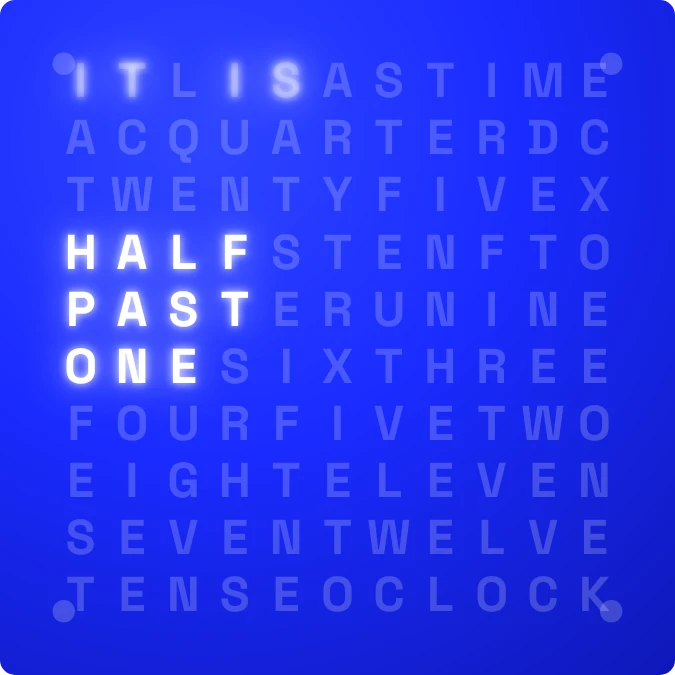
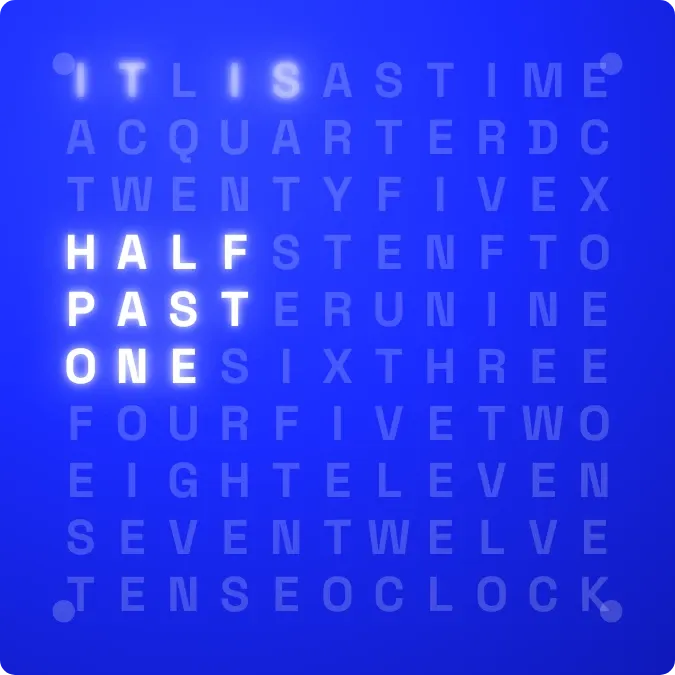
Lightword shows the time as a sentence hidden in a grid of dim blue letters. Only the words for the current time glow white, such as HALF PAST ONE, and the other letters stay faint. Four dots in the corners light up to count the minutes past each five.
- Size
- 2x2 cells
- Kit
- Instruments
- Shows
- Time and date
- Look
- Typographic, minimal and gradient
- Colours
- Blue, dark background
- Good for
- Desk setup, everyday time check and minimal home screen
- Android
- 10 or newer
- Needs
- No additional permissions
- Price
- Free
Kiwi is in beta and is not on Google Play yet. Join to request an invitation.
- at-a-glance
- big-letters
- blue
- bold
- clean
- clock
- digital-clock
- glow
- glowing-text
- half-past
- letter-grid
- letters
- minimal
- minimal-typography
- text-clock
- time
- typography
- white
- word-clock
What changes
- IT IS is always lit. The rest of the sentence changes with the time.
- Every five minutes the minute words change: FIVE, TEN, A QUARTER, TWENTY, TWENTY FIVE and HALF. PAST glows up to half past, and TO glows after that.
- From 35 minutes past the hour, the hour word switches to the next hour, so 7:40 reads TWENTY TO EIGHT.
- At the top of each hour, OCLOCK glows after the hour word instead of any minute words.
- The corner dots light one by one, clockwise from the top left, for each minute past a five-minute step. All four are dim on the exact step.
- Tapping the widget opens the clock.
Data and settings
- Reads the current time, both hours and minutes.
- Nothing to configure.
Set it up
- Open the widget in Kiwi, either from its kit or from this page.
- Tap Use.
- Confirm your launcher's prompt to place it on your home screen.
Good to know
- The words move in five-minute steps, and the corner dots show only the one to four minutes in between.
Widgets like Lightword
 Granite TenMaterial You
 CandlewickSoft UI
 Lime PinstripeMaterial Expressive
 Light Digital ClockiOS & macOS