Slow Fuse
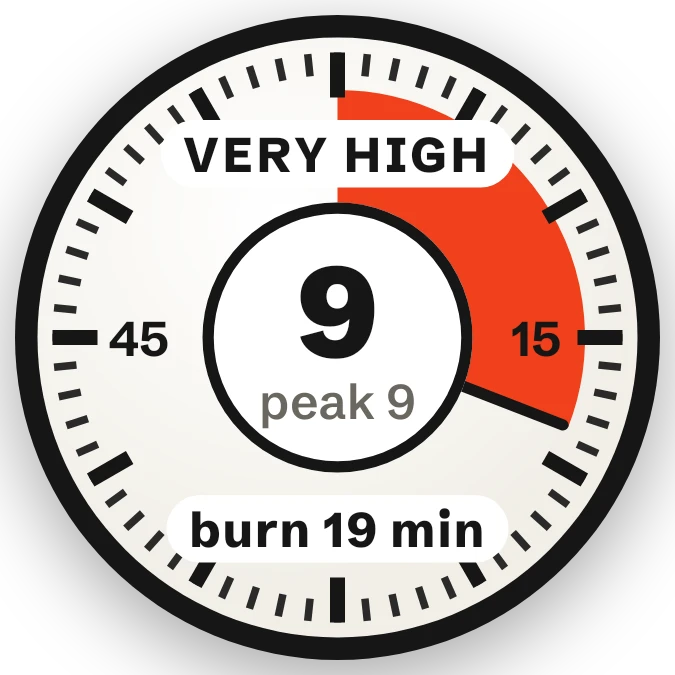
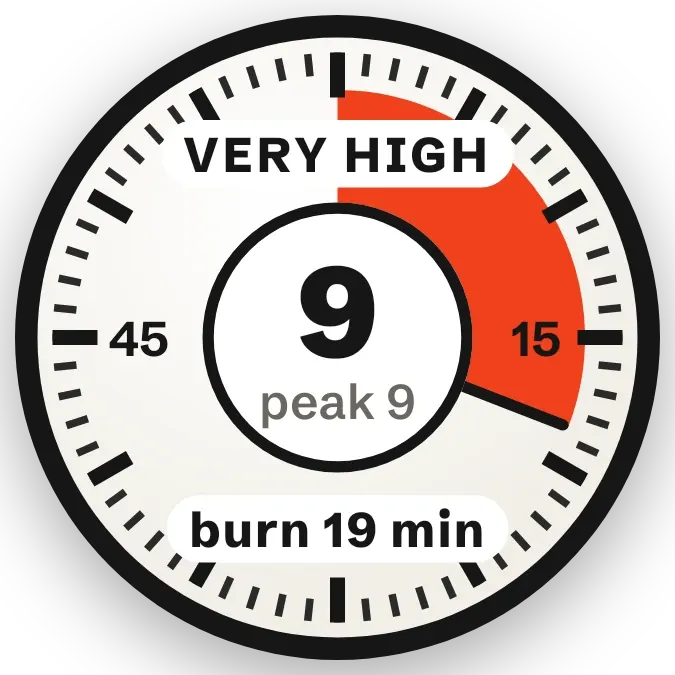
Slow Fuse is a round dial that shows today's UV index. A red wedge sweeps clockwise from the top. The shorter the time fair skin lasts in the sun, the smaller the wedge. A white centre circle shows the UV number and the day's peak, with a UV band label above and a burn time below.
- Size
- 2x2 cells
- Kit
- Instruments
- Shows
- Weather
- Look
- Bold shapes, watch face and hardware
- Colours
- White, black and grey, light background
- Good for
- Beach day, summer and sunscreen
- Android
- 10 or newer
- Needs
- No additional permissions
- Price
- Free
Kiwi is in beta and is not on Google Play yet. Join to request an invitation.
- analog
- at-a-glance
- big-numbers
- black
- bold
- bright
- burn-time
- clock
- countdown
- dial
- forecast
- graphic
- orange
- red
- sun
- sun-safety
- sunburn
- sunscreen
- timer
- typographic
- uv-index
- uv-timer
- warm
- weather
- white
What changes
- At UV 1 or above, the centre shows the current UV number with the day's peak beneath it, and the red wedge is drawn on the dial.
- As UV rises the wedge shrinks. At low UV it covers a large part of the dial, and at very high UV it is a narrow slice.
- From UV 3 upward, a dark hand points to the end of the wedge.
- The label above the number reads Low UV, Moderate, High UV, Very high or Extreme, depending on the current UV.
- The chip below the number gives the burn time, from burn 1 h+ at low UV down to burn 15 min at the highest UV.
- Below UV 1 the wedge and hand disappear and the centre shows a dash with the day's peak. The label reads No UV now in daytime and Sun's down at night.
Data and settings
- Reads the current UV index and the day's peak UV from the weather for your city.
- Reads whether it is day or night, to choose between No UV now and Sun's down.
- Uses your city for the weather. If none is set, the widget shows No city set.
Set it up
- Open the widget in Kiwi, either from its kit or from this page.
- Tap Use.
- Confirm your launcher's prompt to place it on your home screen.
- Set a city when the widget asks for one, so it can read the UV for your area.
Good to know
- It needs an internet connection and a city to get UV data. Until weather is available it shows a dash in the centre and the label UV index.
- Burn times are set steps tied to the UV level and are written for fair skin. They are a guide, not a personal measure.
- The dial shows UV for your city only, not for where you are standing at the moment.
- The wedge and hand are hidden when UV is below 1, and the hand is also hidden below UV 3.
Widgets like Slow Fuse
 Last LightScenes
 CandlewickSoft UI
 SandglowScenes
 Sunpane DuoGlass