Weektrace
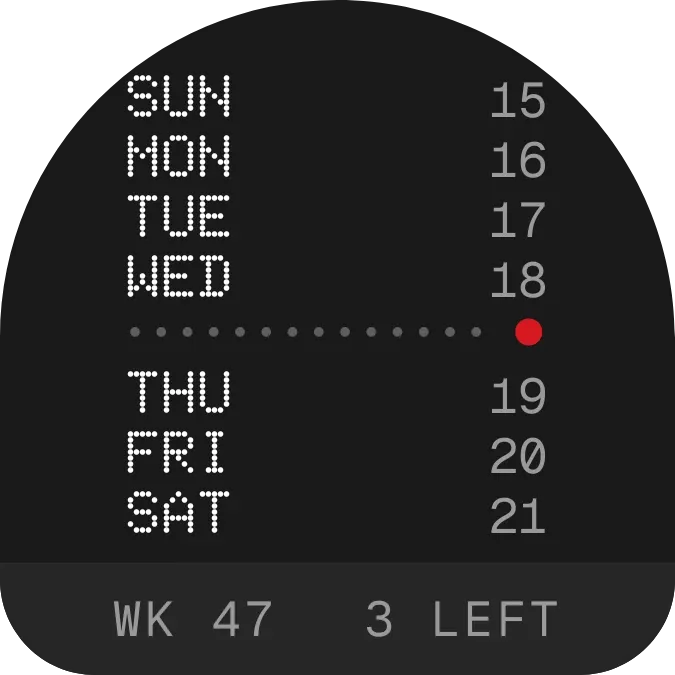
Weektrace lists the seven days of the current week on a charcoal arch. Each weekday is written in white dotted capitals, with its date number in grey on the right. A dotted line ending in a red dot sits under today's row, and a darker bar at the bottom shows the week number and how many days remain.
- Size
- 2x2 cells
- Kit
- Nothing
- Shows
- Time and date
- Look
- Dot matrix, typographic and minimal
- Colours
- Black and grey, dark background
- Looks like
- Nothing widgets
- Good for
- Daily check-in, weekly planning and workweek
- Android
- 10 or newer
- Needs
- No additional permissions
- Price
- Free
Kiwi is in beta and is not on Google Play yet. Join to request an invitation.
- arch
- black
- calendar
- dark
- date
- day-of-week
- days-to-go
- dot-matrix
- dots
- grey
- minimal
- monospace
- nothing
- red
- retro
- rounded
- time-left
- typographic
- week
- weekly-calendar
- white
What changes
- The dotted line with the red dot sits directly below today's row, so it moves down one row each day.
- The bottom bar shows the week number on the left, such as WK 47.
- The right side of the bar counts the days left in the week, from 6 left down to 1 left.
- On the last day of the week, the count reads Last day.
- Tapping the widget opens the calendar.
Data and settings
- Reads the current date and time on your device.
- Nothing to set.
Set it up
- Open the widget in Kiwi, either from its kit or from this page.
- Tap Use.
- Confirm your launcher's prompt to place it on your home screen.
Widgets like Weektrace
 WeeksplicePlayful
 Pearl RunwayInstruments
 Pip CircuitWatch Face



