Orbit Pop
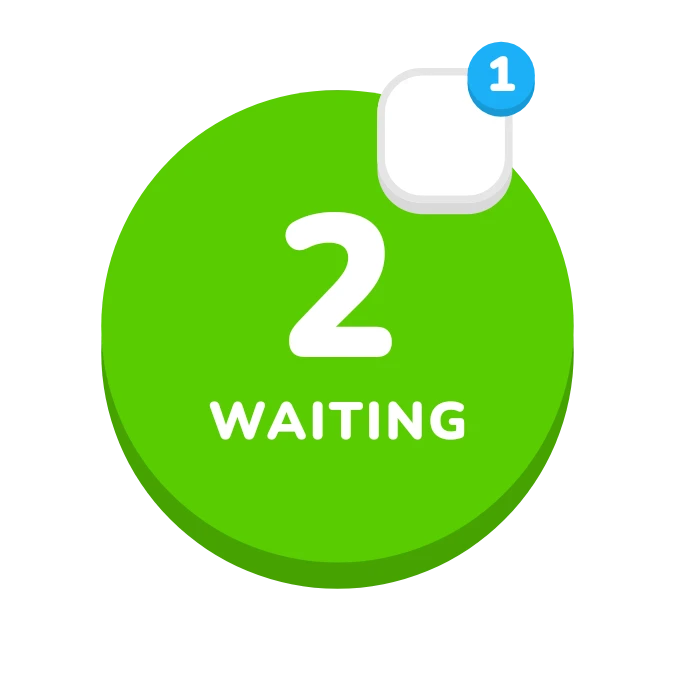
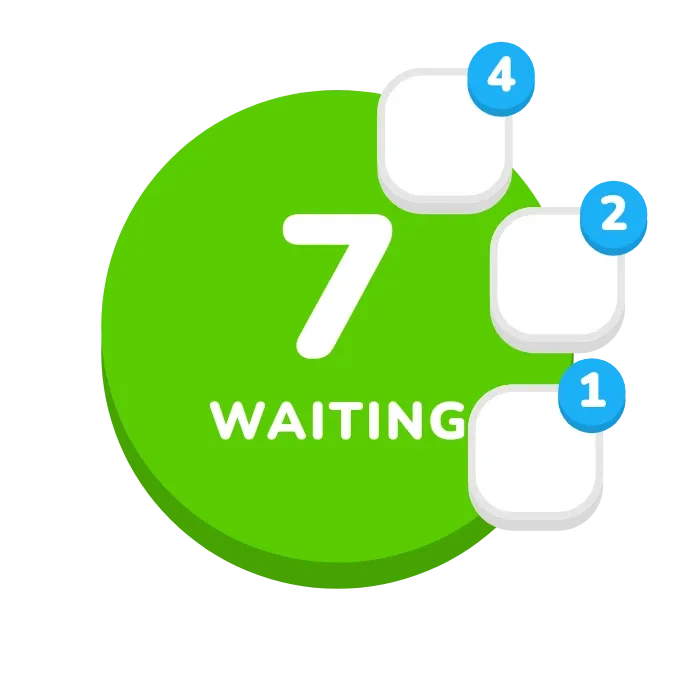
Orbit Pop shows a round green button with the number of notifications waiting and the word "waiting" beneath it. Up to four app icons sit on white tiles along the right edge of the button, each with a blue badge giving that app's count. When nothing is waiting, the button turns gold.
- Size
- 2x2 cells
- Kit
- Playful
- Shows
- Notifications
- Look
- Bold shapes, cartoon and 3D
- Colours
- Green and white, light background
- Good for
- Checking alerts, inbox zero and work breaks
- Android
- 10 or newer
- Needs
- Notification access
- Price
- Free
Kiwi is in beta and is not on Google Play yet. Join to request an invitation.
- app-badges
- app-icons
- at-a-glance
- badge-count
- big-numbers
- blue
- bold
- bright
- chunky
- counter
- cute
- green
- notification-count
- notifications
- playful
- round
- rounded
- tap-counter
- waiting
- white
What changes
- With notifications waiting, the green button shows the total count in large white numbers above the word "waiting".
- Up to four apps appear as icon tiles around the button, each with a blue badge showing how many notifications that app has.
- Tapping an app's tile opens that app.
- When there are no notifications, the button turns gold and shows a star with the words "All clear". The app tiles are hidden.
- Without notification access, the button turns white with a green bell and the text "Tap to see who's waiting". No counts or app tiles appear.
Data and settings
- Reads the notifications currently waiting on your device: the total, and the count for each app.
- Nothing to configure in the widget itself.
Set it up
- Open Orbit Pop in Kiwi, either from its kit or from this page.
- Tap Use.
- Confirm your launcher's prompt to place the widget.
- Give Kiwi Notification access when asked, so the widget can read your waiting notifications.
Permissions
- Notification access, to count your notifications. Counting them takes notification access. Only how many there are, and from which app; never what they say.
Good to know
- It needs Notification access. Until that is given, it shows the white "Tap to see who's waiting" button instead of counts.
- Only four apps get an icon tile, even if more apps have notifications waiting.
- The center number is the total of waiting notifications, so it can be higher than the badge counts you can see.
Widgets like Orbit Pop
 DaydrainMaterial Expressive
 SipdomeMaterial Expressive
 HatchmarkMaterial You
 Sherbet GridBento