Needle Lamp
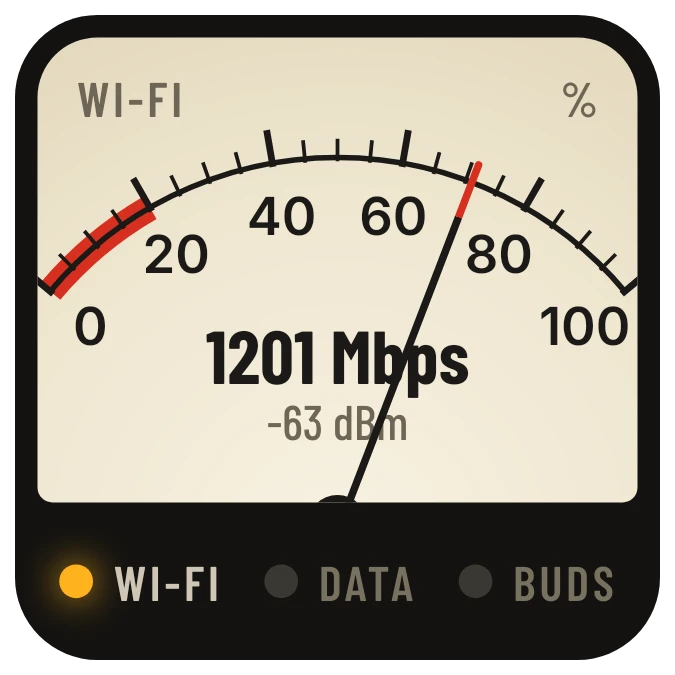
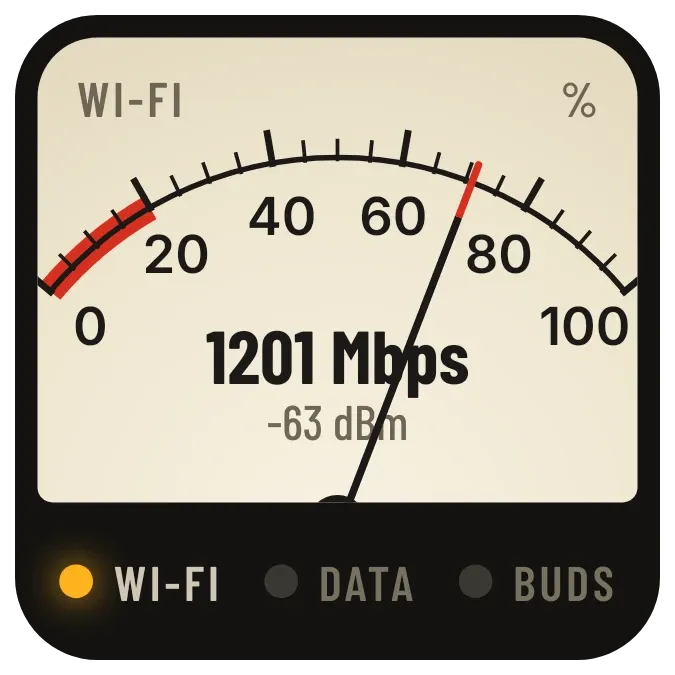
Needle Lamp is a cream analogue meter with a scale from 0 to 100 percent and a red-tipped needle that swings with your Wi-Fi signal strength. A red band marks the low end of the scale. The centre reads the Wi-Fi speed in Mbps with the signal in dBm below it. Three lamps along the bottom stand for Wi-Fi, data and buds.
- Size
- 2x2 cells
- Kit
- Instruments
- Shows
- Phone controls
- Look
- Retro, hardware and typographic
- Colours
- Cream and black, dark background
- Good for
- Checking wifi speed, working from home and troubleshooting internet
- Android
- 10 or newer
- Needs
- No additional permissions
- Price
- Free
Kiwi is in beta and is not on Google Play yet. Join to request an invitation.
- analog
- big-numbers
- black
- bluetooth
- connection
- cream
- dark
- dial
- gauge
- hardware
- indicator-lights
- internet-speed
- mbps
- meter
- needle
- orange
- red
- retro
- signal-strength
- tactile-hardware
- typography
- vintage
- warm
- wifi
- wifi-signal
What changes
- When you are connected to Wi-Fi, the needle points to your signal strength on the 0 to 100 scale, and the centre shows the speed in Mbps with the signal in dBm underneath.
- A weak Wi-Fi signal puts the needle low on the scale, in or near the red band.
- On mobile data with no Wi-Fi, the centre shows MOBILE DATA in black with the words no Wi-Fi beneath it.
- When there is no internet, the centre shows OFFLINE in red with the words no internet beneath it. In airplane mode it shows AIRPLANE in red with the words radios off.
- On another kind of connection, such as ethernet, the centre shows the connection type in capitals.
- The Wi-Fi lamp glows amber when Wi-Fi is connected. The data lamp glows amber on mobile data and red when offline. The buds lamp glows amber when Bluetooth audio is connected.
Data and settings
- Reads the Wi-Fi speed in Mbps and the signal strength in dBm and as a percentage from your phone.
- Reads whether you are online, the connection type, and whether airplane mode is on.
- Reads whether a Bluetooth audio device is connected, for the buds lamp.
Set it up
- Open Needle Lamp in Kiwi, either from its kit or from this page.
- Tap Use.
- Confirm your launcher's prompt to place the widget on your home screen.
Good to know
- The needle and the Mbps and dBm readings follow Wi-Fi. On mobile data the centre shows a label instead of a speed.
- The buds lamp lights only for a connected Bluetooth audio device, not for other Bluetooth devices.
- The scale is a percentage of signal strength. It is not a measure of internet speed.
Widgets like Needle Lamp
 TracksideWatch Face
 Plane ParadoxBento
 DosemeterTactile Hardware
 Pip CircuitWatch Face