Dateflare
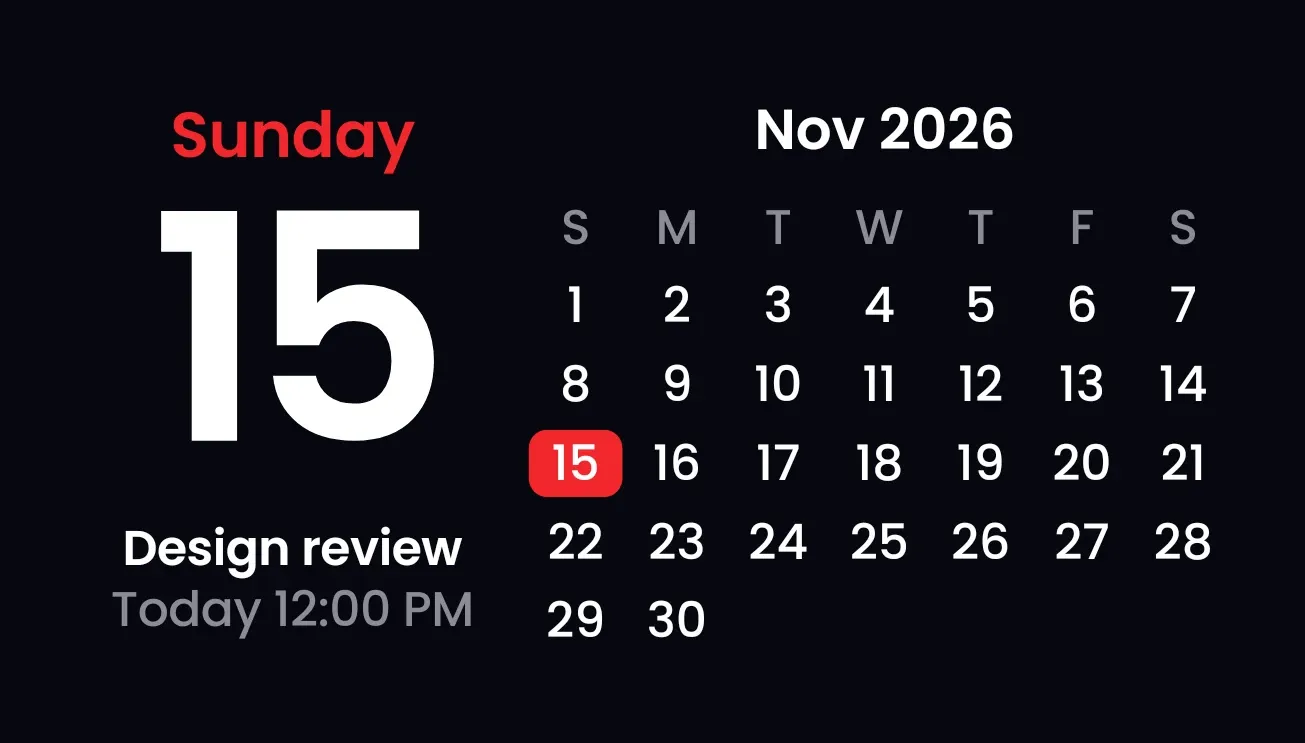
Dateflare puts the weekday and today's date in large white numerals on a black background, with a monthly grid beside it. Today is marked with a red block in the grid, and the weekday name is in red. Under the date it shows your next calendar event with its day and time.
- Size
- 4x2 cells
- Kit
- One UI
- Shows
- Calendar, Time and date
- Look
- Typographic, minimal and bold shapes
- Colours
- Black, dark background
- Looks like
- Samsung widgets
- Good for
- Daily planning, work and meeting scheduling
- Android
- 10 or newer
- Needs
- No additional permissions
- Price
- Free
Kiwi is in beta and is not on Google Play yet. Join to request an invitation.
- agenda
- big-numbers
- black
- bold
- calendar
- clean
- dark
- date
- date-display
- day-of-week
- event
- grey
- minimal
- month
- month-calendar
- next-event
- one-ui
- red
- samsung
- schedule
- typographic
- white
- year
What changes
- The weekday name, the large date number and the month and year above the grid change as the date changes.
- Today's number in the grid sits on a red block. The grid has five or six week rows depending on the month.
- The next event's title appears under the date, with a day and time such as Today 12:00 PM.
- While the next event is happening, the line under its title reads Now in red in place of the time.
- With calendar access and no upcoming event, it shows No events with the line Week is clear.
- Without calendar access, it shows Calendar off with the line Tap to allow. Tapping the date or grid opens the calendar, and tapping the event opens it.
Data and settings
- Reads the current date and time to show the weekday, the date, the month and the highlighted day.
- Reads your calendar for the next upcoming event, including its title, day and time.
- No options to set.
Set it up
- Open Dateflare in Kiwi, either from its kit or from this page.
- Tap Use.
- Confirm your launcher's prompt to place the widget on your home screen.
Good to know
- Only the next event is shown. Later events on the same day or after it don't appear.
- A long event title is cut off with an ellipsis to fit the space under the date.
- Events appear only when calendar access is allowed. Without it, the widget shows Calendar off.
- The grid shows only the current month's days. Spaces for days outside that month are left empty.
Widgets like Dateflare
 DotfallNothing
 Pale AlmanacClear
 Tinted AgendaiOS & macOS
 DayslideInstruments