Cinder Fang
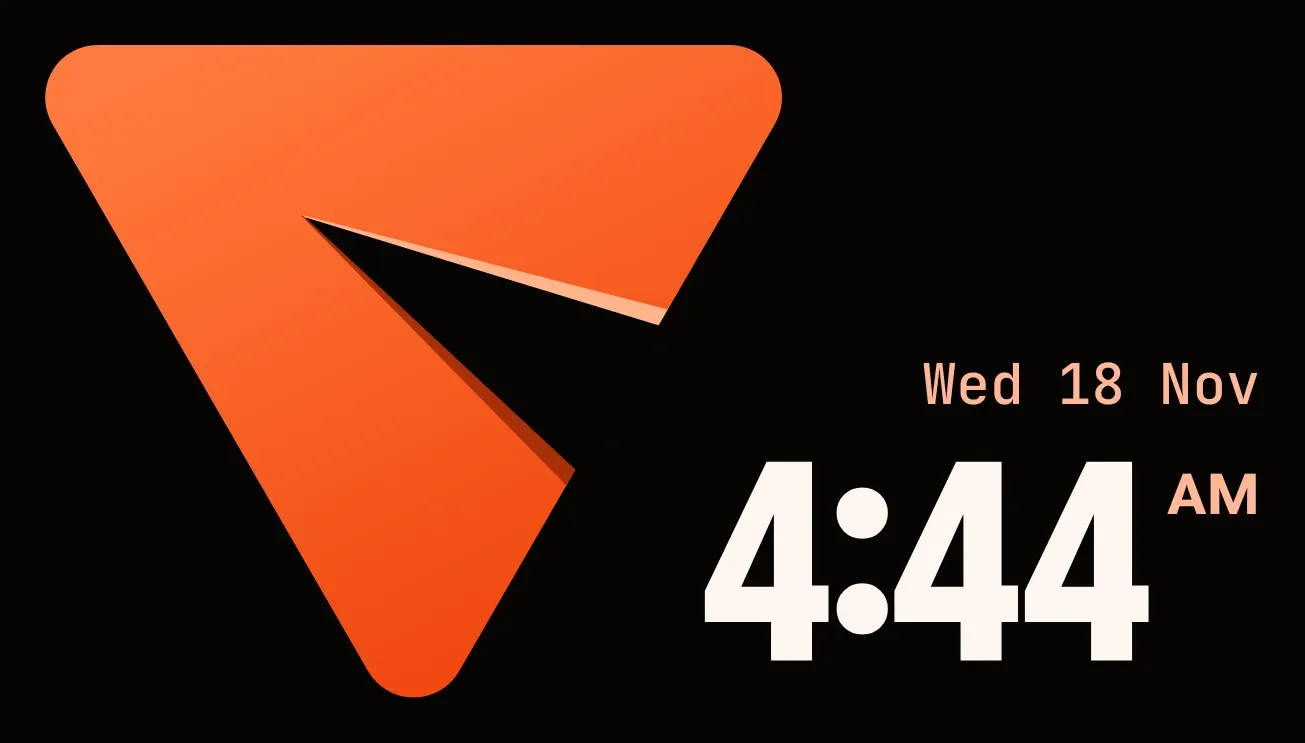
A rounded orange triangle sits on a black background at the left, with a narrow cut running into it from one side. At the right, the weekday, day and month appear in small peach lettering above the time in large, bold off-white numerals, with AM or PM beside it.
- Size
- 4x2 cells
- Kit
- Tactile Hardware
- Shows
- Time and date
- Look
- Bold shapes, minimal and typographic
- Colours
- Black and orange, dark background
- Good for
- Daily routine, morning and time checks
- Android
- 10 or newer
- Needs
- No additional permissions
- Price
- Free
Kiwi is in beta and is not on Google Play yet. Join to request an invitation.
- big-numbers
- black
- bold
- clock
- cut-out
- dark
- date
- day-of-week
- digital-clock
- digits
- geometric
- gradient
- minimal
- orange
- peach
- rounded
- shadow
- time
- triangle
- typographic
- watch-face
- white
What changes
- The cut in the triangle gets deeper with each minute that passes, starting as a small notch at the top of the hour and reaching far into the shape by the end of it.
- When a new hour begins, the cut starts shallow again and moves to a different side of the triangle. It cycles through three positions, so every third hour it returns to the same side.
- The time and date update as the clock changes, and the date reads as weekday, day and month, such as Wed 18 Nov.
- AM or PM appears beside the time only when the phone uses a 12-hour clock. On a 24-hour clock it is left out.
- Tapping the widget opens the clock.
Data and settings
- Reads the current time and date from the phone.
- Shows the time in the phone's 12-hour or 24-hour format. There is nothing to set in the widget itself.
Set it up
- Open the widget in Kiwi, either from its kit or from this page.
- Tap Use.
- Confirm your launcher's prompt to place it on the home screen.
Widgets like Cinder Fang
 RimrunnerWatch Face
 ChicaneWatch Face
 ClovercutMaterial Expressive
 Lime WatchWatch Face